Indice
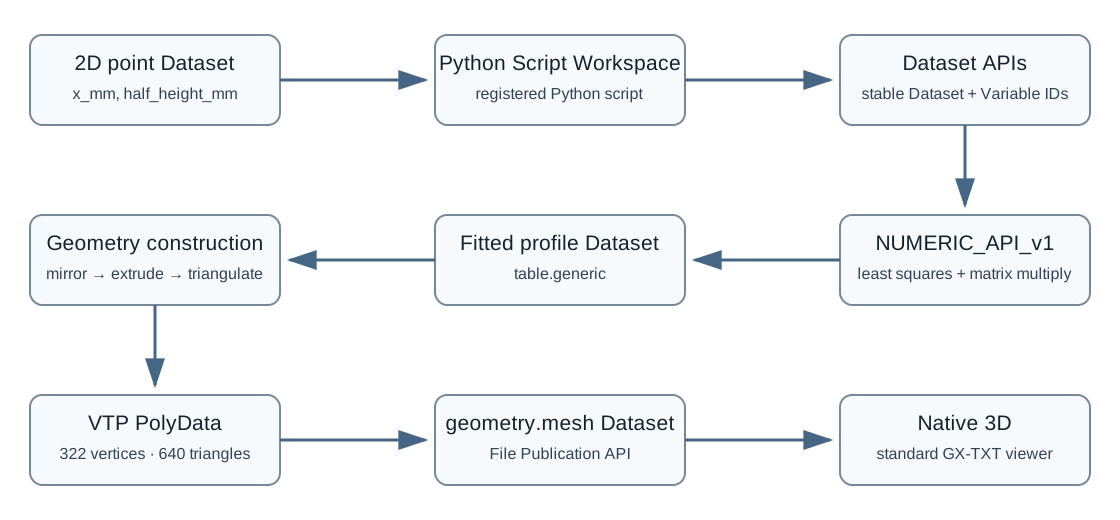
Il tutorial parte da una curva 2D descritta da punti discreti, esegue un fit numerico, costruisce un profilo chiuso simmetrico, lo estrude lungo Z, triangola pareti e testate e pubblica la geometria risultante come Dataset geometry.mesh in formato VTP. La mesh può quindi essere aperta direttamente in Native 3D.
1. Obiettivo e file dell'esercizio
Il flusso completo è:
2D point Dataset
      ↓
Python Script Workspace
      ↓
Canonical Dataset API
      ↓
NUMERIC_API_v1 least-squares fit
      ↓
dense fitted 2D profile
      ↓
Dataset Publication API v2
      ↓
mirror profile into closed section
      ↓
extrude along Z
      ↓
triangle mesh
      ↓
VTP PolyData
      ↓
Dataset File Publication API
      ↓
geometry.mesh Dataset
      ↓
Native 3D2. Dataset di ingresso e modello geometrico
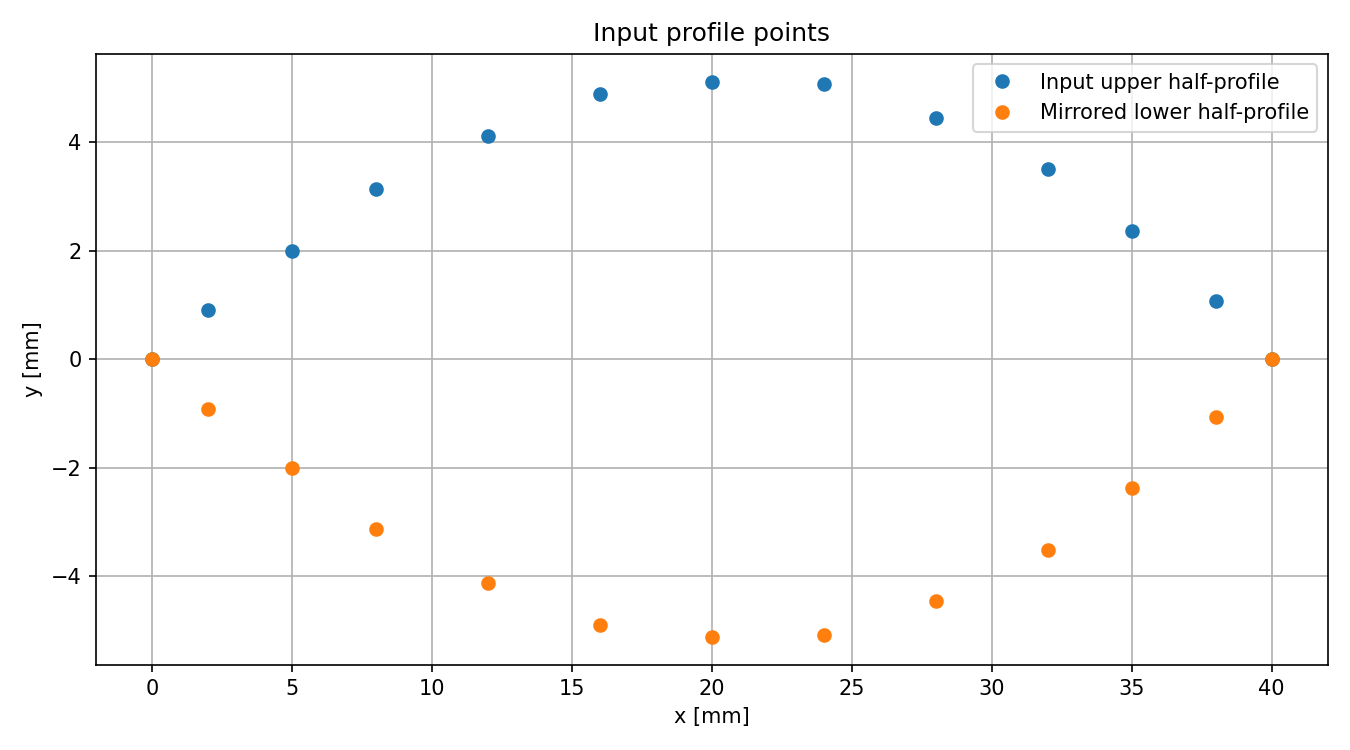
Il CSV contiene due variabili:
x_mm
half_height_mm
I punti descrivono la metà superiore di una sezione simmetrica. L'ipotesi geometrica esplicita del tutorial è:
upper boundary = +h(x)
lower boundary = -h(x)
Questa simmetria non va assunta per profili generici: qui fa parte del modello.
3. Il fit matematico
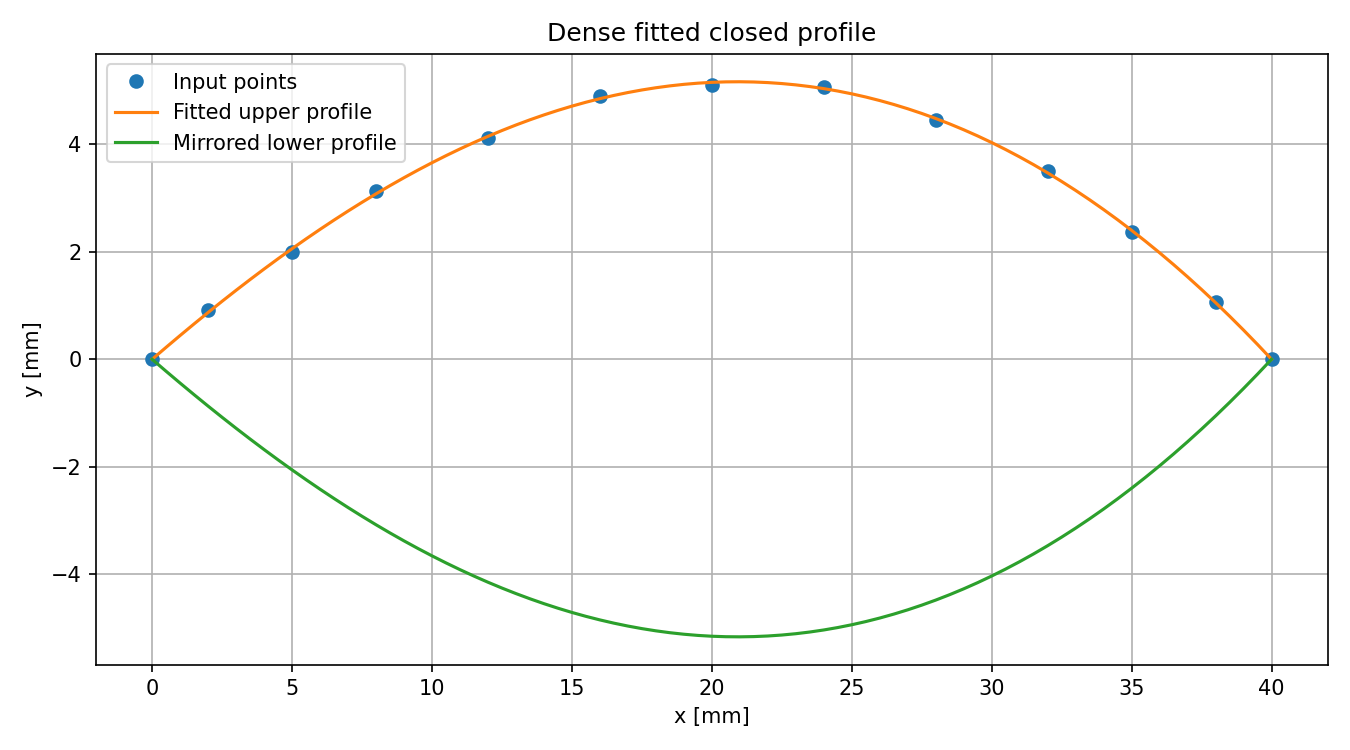
Si normalizza la coordinata:
u = (x - x_min) / (x_max - x_min)e si adotta il modello:
h(u) = u(1-u) * (a0 + a1*u + a2*u^2 + a3*u^3)Il fattore u(1-u) forza:
h(0) = 0
h(1) = 0
Il problema dei coefficienti è un least squares lineare A a ≈ h. Python costruisce la matrice del modello; il servizio numerico GX-TXT risolve il sistema tramite:
NUMERIC_API_v1
→ linear_matrix
→ solve
Il provider numerico viene usato anche per valutare il profilo fit tramite linear_matrix / multiply.
a0=18.0038, a1=7.09548, a2=-4.7417, a3=2.03288; residual norm ≈ 0.125429; condition number ≈ 223.22.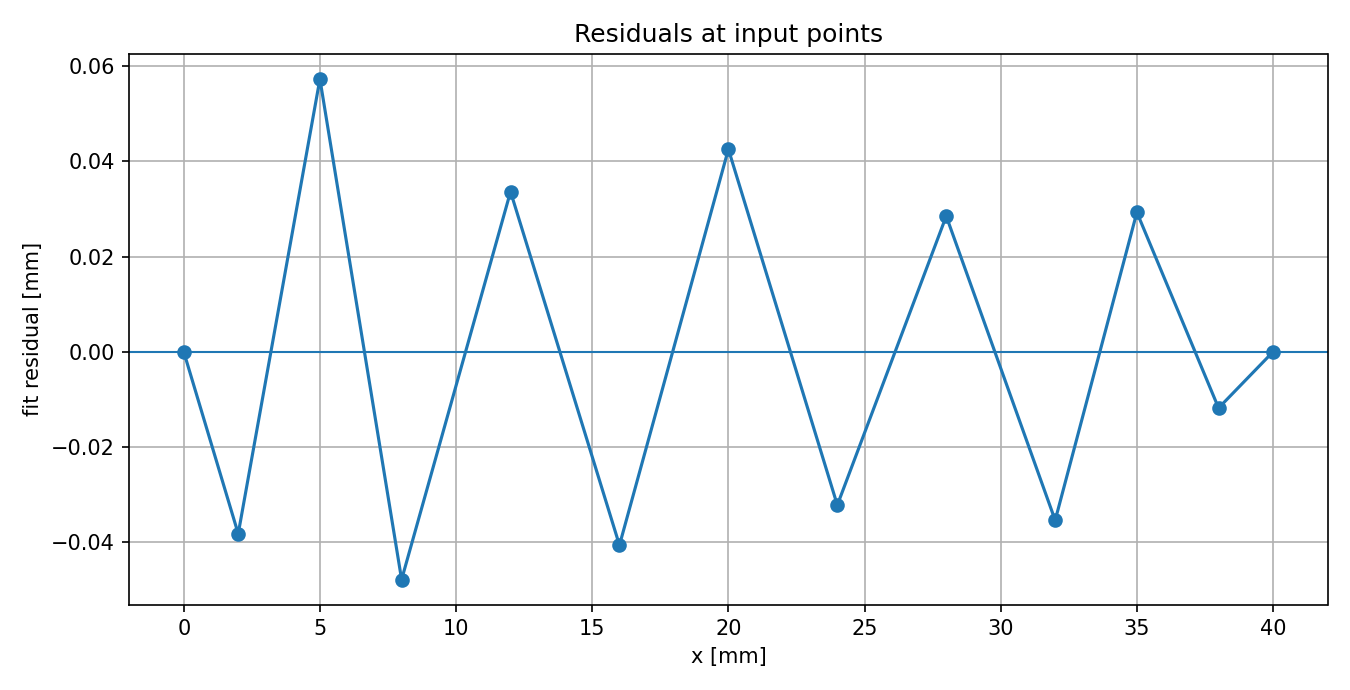
4. Preparare la Session e registrare lo script
4.1 Importare la curva
Importa profile_curve_points.csv come normale Dataset tabellare. Un ID comodo è:
profile_curve_pointsVerifica che entrambe le colonne siano numeriche.
4.2 Registrare lo script
Apri il Python Script Workspace o la Script Library e importa profile_curve_to_extruded_mesh.py. Un ID adatto è:
tutorial.profile_to_meshAssegna lo script alla Session e selezionalo nel runner:
Analysis → Python ScriptImposta il Dataset della curva come Analysis Source primary.
5. API richieste
Lo script dichiara e verifica:
CANONICAL_DATASET_API_v2@2;
DATASET_VARIABLE_SCHEMA_API_v3@3;
NUMERIC_API_v1@1:math.numeric+complex_linear_algebra;
DATASET_PUBLICATION_API_v2@2;
DATASET_FILE_PUBLICATION_API_v1@1;
SESSION_PERSISTENCE_API_v1@1
Le stesse dipendenze vengono controllate a runtime con gxtxt_api_require(...).
6. Leggere il Dataset attraverso GX-TXT
Lo script ottiene l'identità del Dataset dal context:
ctx = gxtxt_context()
source_id = ctx["inputs"]["primary"]["dataset_id"]
Le Variable ID di x_mm e half_height_mm vengono risolte tramite DATASET_VARIABLE_SCHEMA_API_v3; i valori vengono letti con CANONICAL_DATASET_API_v2 / read_range.
7. Validazione dell'ingresso
Prima del fit vengono verificati:
- almeno 6 punti finiti;
- X strettamente crescente dopo l'ordinamento;
- half-height non negativa;
- span X positivo.
Un ingresso scientificamente non valido interrompe il workflow prima della generazione della geometria.
8. Fit e profilo denso
8.1 Least squares
fit = gxtxt_api_call(
    "NUMERIC_API_v1",
    "linear_matrix",
    [
        "solve",
        {"real": design},
        {"real": rhs},
        {"rank_policy": "error"},
    ],
)
Per una matrice sovradeterminata full-rank l'operazione restituisce la soluzione least squares. Controlla almeno residual_norm, rank e condition_number.
8.2 Campionamento denso
Il tutorial genera 81 posizioni X e valuta il modello usando ancora NUMERIC_API_v1, questa volta con:
linear_matrix / multiplyI valori di half-height sono limitati al dominio fisico h ≥ 0 e gli estremi vengono riportati esattamente a zero.
9. Pubblicare il profilo derivato
Il profilo denso viene pubblicato come:
Dataset ID = tutorial.python.fitted_profile
contract   = table.generic
variables  = v_x, v_half_height
Si usa DATASET_PUBLICATION_API_v2. In questo modo la geometria successiva possiede un prodotto scientifico intermedio esplicito e tracciabile.
10. Costruire la sezione chiusa
La parte superiore è:
(x, +h)La parte inferiore è:
(x, -h)percorsa in ordine inverso. Gli estremi non vengono duplicati. Con 81 campioni del mezzo profilo si ottengono:
closed ring vertices = 16011. Estrusione e triangolazione
11.1 Estrusione
La profondità usata dal tutorial è:
extrusion_depth = 12 mm
Z front = -6 mm
Z back  = +6 mm
Si creano due copie della sezione chiusa, una per ciascuna faccia.
11.2 Pareti
Ogni coppia di spigoli corrispondenti forma un quadrilatero, poi diviso in due triangoli.
11.3 Testate
Si aggiunge un vertice centrale su ciascuna estremità e si costruiscono triangoli a ventaglio. Questa strategia è adeguata al semplice profilo convesso del tutorial, ma non è un triangolatore generale per poligoni concavi o auto-intersecanti.
11.4 Dimensione attesa
half-profile samples = 81
closed ring vertices = 160
mesh vertices        = 322
mesh triangles       = 640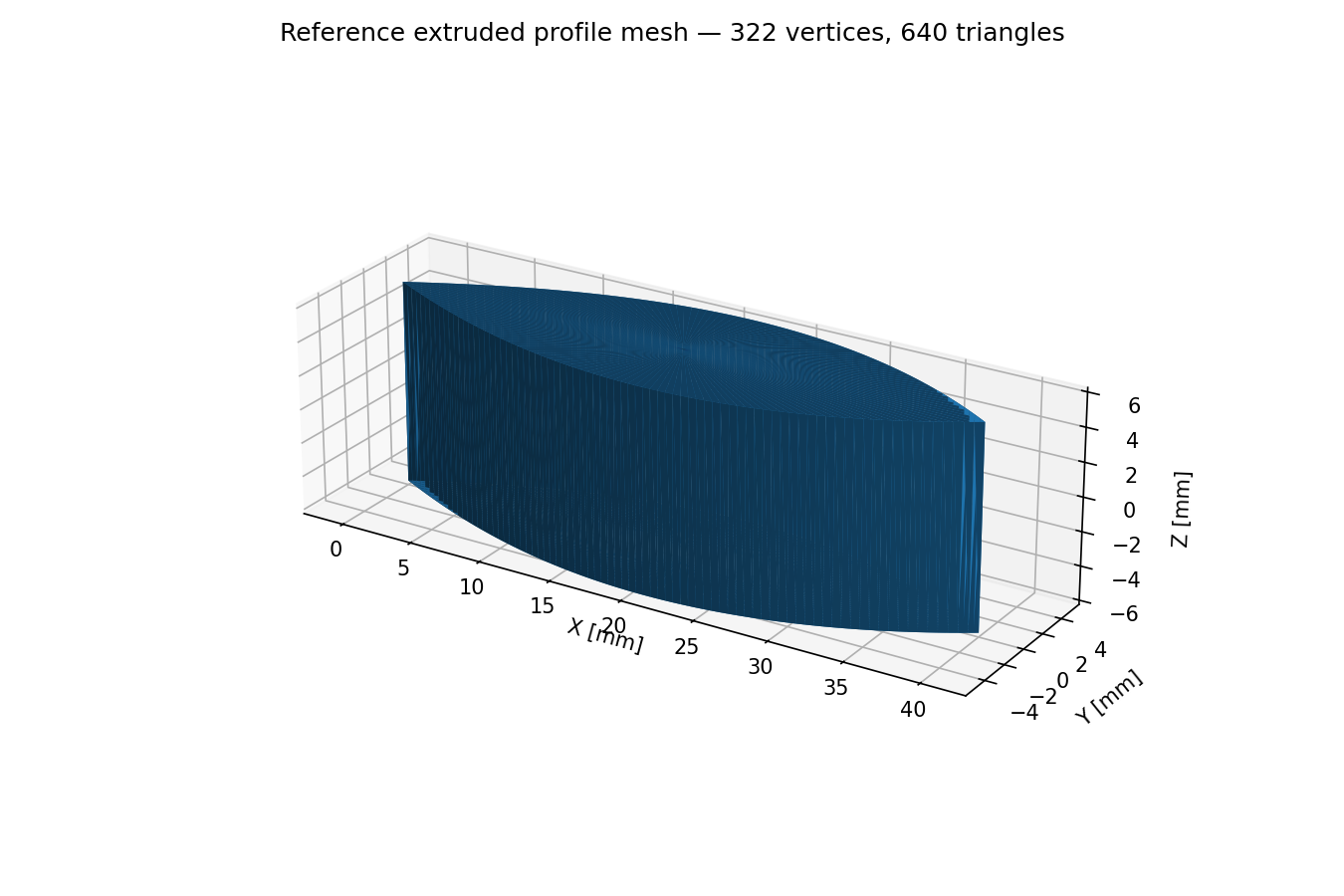
12. Perché VTP e geometry.mesh
GX-TXT dispone già del contratto standard:
geometry.meshe Native 3D legge VTK XML PolyData .vtp. Non serve quindi inventare un formato CSV privato per vertici e triangoli.
Il file viene scritto completamente nella directory di output dello script, poi registrato con:
DATASET_FILE_PUBLICATION_API_v1 / publishcon:
dataset_id = tutorial.python.extruded_profile_mesh
contract   = geometry.mesh
format     = vtp
media_type = application/vnd.vtk
13. Due prodotti, due API di pubblicazione
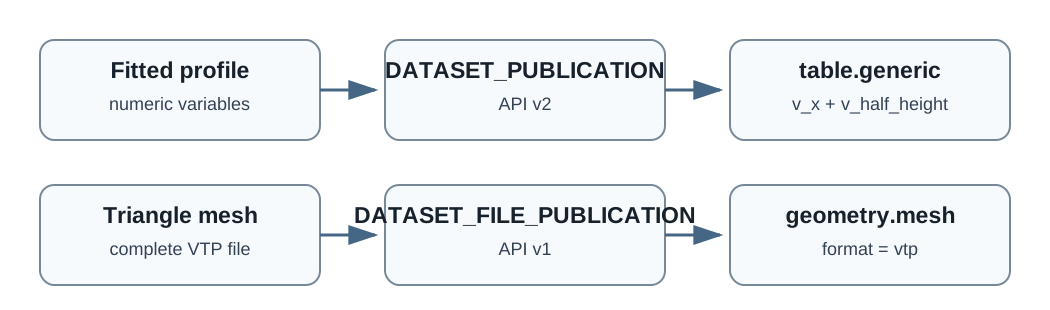
Profilo fit: variabili numeriche strutturate → DATASET_PUBLICATION_API_v2.
Mesh triangolare: file VTP completo → DATASET_FILE_PUBLICATION_API_v1.
Non è utile appiattire artificialmente una mesh in colonne CSV soltanto per usare il writer tabellare.
14. Provenance e persistenza
Il Dataset mesh registra la lineage verso:
original point Dataset
fitted profile Dataset
e metadata strutturati come:
geometry.kind
geometry.vertex_count
geometry.triangle_count
geometry.extrusion_depth
geometry.coordinate_unit
Al termine lo script chiama:
gxtxt_api_call(
    "SESSION_PERSISTENCE_API_v1",
    "commit",
    [],
)
Non modifica direttamente metadata/datasets.ini o manifest.ini.
15. Eseguire e verificare il risultato
Il log atteso contiene informazioni di questo tipo:
Profile coefficients: ...
Fit residual norm: ...
Design condition number: ...
Published fitted profile Dataset: tutorial.python.fitted_profile
Mesh: vertices=322 triangles=640 depth=12
Published 3D mesh Dataset: tutorial.python.extruded_profile_mesh
PASS PROFILE_MESH_TUTORIAL ...
Dopo il run controlla due Dataset:
tutorial.python.fitted_profile
tutorial.python.extruded_profile_mesh
Il secondo deve avere:
contract = geometry.mesh
format   = vtp
Apri quindi Native 3D e seleziona tutorial.python.extruded_profile_mesh. Non è necessario alcun renderer Python privato.
16. Divisione delle responsabilità
16.1 Python/NumPy
- ordinamento;
- normalizzazione delle coordinate;
- costruzione della base;
- mirroring del profilo;
- estrusione;
- indici dei triangoli;
- serializzazione VTP.
16.2 API GX-TXT
- identità Dataset;
- identità Variable;
- lettura scientifica dell'input;
- least squares e valutazione matriciale;
- pubblicazione del Dataset strutturato;
- registrazione della mesh;
- SHA-256;
- provenance;
- persistenza della Session.
Il framework va usato per i servizi riusabili e per lo stato scientifico/persistente; operazioni elementari su liste e array restano naturalmente nel codice Python.
17. Limiti geometrici del tutorial
Questa procedura è un'estrusione semplice, non un kernel CAD. Non implementa:
lofting
sweeps along curved paths
twist
holes
multiple contour loops
booleans
B-rep topology
automatic remeshing
adaptive curvature refinement
Inoltre il modello di fit forza spessore nullo alle due estremità; la triangolazione a ventaglio delle testate è adatta solo alla geometria semplice usata qui.
18. Unità
Il Dataset di esempio usa millimetri. L'estrusione impiega la stessa unità della coordinata X, quindi:
X, Y, Z → mmSe usi un altro Dataset, mantieni coerenti unità di profilo ed estrusione e conserva l'unità nei metadata.
19. Esperimenti successivi
19.1 Cambiare la profondità
Modifica:
extrusion_depth = 12.0e confronta geometria e metadata pubblicati.
19.2 Aumentare la risoluzione
Modifica:
profile_samples = 81Aumentando i campioni crescono vertici e triangoli della mesh.
19.3 Cambiare la complessità del modello
La matrice di base può essere ampliata con altri termini. Dopo ogni modifica controlla però il condition_number: un modello più flessibile non è automaticamente migliore.
20. Errori comuni
20.1 Riaprire il CSV
Dopo l'importazione usa Dataset ID e Variable ID. Leggere di nuovo il file sorgente rompe il normale flusso di identità e provenance.
20.2 Pubblicare vertici e facce come CSV arbitrario
Se il risultato è una mesh, usa geometry.mesh e un formato geometrico standard supportato.
20.3 Ignorare il conditioning
Un sistema formalmente risolvibile può essere numericamente poco affidabile. Controlla rank, residual e condition number.
20.4 Assumere sempre la simmetria
Il mirroring è un'ipotesi del modello di questo esercizio, non una regola generale.
20.5 Usare sempre la triangolazione a ventaglio
Profili concavi, con fori o più loop richiedono un triangolatore robusto.
21. Evoluzione naturale del workflow
Dopo questo esempio puoi sostituire la costruzione geometrica semplice con:
- profili provenienti da digitalizzazione di immagini o curve sperimentali;
- interpolazioni o fit più sofisticati;
- estrusioni parametrizzate;
- triangolatori robusti;
- mesh destinate a CFD o analisi successive;
- pubblicazione di più prodotti geometrici collegati allo stesso Dataset sorgente.
Quando il workflow diventa stabile, riutilizzato da più Session o dotato di configurazione propria, conviene promuoverlo da script registrato a normale modulo GX-TXT.
22. Modello mentale finale
↓
public Dataset APIs
↓
Python domain logic + GX-TXT numeric service
↓
structured intermediate Dataset
↓
geometry construction
↓
standard VTP payload
↓
geometry.mesh publication
↓
Native 3D
Il punto centrale è separare il significato scientifico e la geometria costruita dallo script dai servizi che il framework già possiede: identità, numerica riusabile, publication, provenance e persistenza.
23. Sorgente completo
Apri profile_curve_to_extruded_mesh.py
"""GX-TXT tutorial: fit a 2D point curve, build a profile, extrude it,
triangulate the extrusion, and publish the 3D mesh as a canonical geometry.mesh Dataset.

Designed for the GX-TXT Python Script Workspace / analysis.python_script workflow.

SPDX-License-Identifier: GPL-3.0-or-later
"""

from pathlib import Path
import numpy as np

from gxtxt import gxtxt_api_call, gxtxt_api_require, gxtxt_context

gxtxt_api_require([
    "CANONICAL_DATASET_API_v2@2",
    "DATASET_VARIABLE_SCHEMA_API_v3@3",
    "NUMERIC_API_v1@1:math.numeric+complex_linear_algebra",
    "DATASET_PUBLICATION_API_v2@2",
    "DATASET_FILE_PUBLICATION_API_v1@1",
    "SESSION_PERSISTENCE_API_v1@1",
])

ctx = gxtxt_context()
source_id = ctx["inputs"]["primary"]["dataset_id"]
if not source_id:
    raise RuntimeError("Profile tutorial: select one primary Dataset.")

print(f"GX-TXT Python profile tutorial; source Dataset={source_id}")

schema = gxtxt_api_call("DATASET_VARIABLE_SCHEMA_API_v3", "list", [source_id])

def variable_by_canonical(items, canonical):
    for item in items:
        if item.get("canonical") == canonical:
            return item
    raise RuntimeError(
        f"Profile tutorial: Dataset {source_id} has no canonical variable {canonical!r}."
    )

x_desc = variable_by_canonical(schema, "x_mm")
h_desc = variable_by_canonical(schema, "half_height_mm")
x_id = x_desc["variable_id"]
h_id = h_desc["variable_id"]

description = gxtxt_api_call("CANONICAL_DATASET_API_v2", "describe", [source_id])
row_count = int(description["row_count"])
block = gxtxt_api_call(
    "CANONICAL_DATASET_API_v2",
    "read_range",
    [source_id, [x_id, h_id], 0, row_count],
)

x = np.asarray(block[x_id]["values"], dtype=float).reshape(-1)
h = np.asarray(block[h_id]["values"], dtype=float).reshape(-1)
good = np.isfinite(x) & np.isfinite(h)
x = x[good]
h = h[good]

if len(x) < 6:
    raise RuntimeError("Profile tutorial: at least six finite points are required.")

order = np.argsort(x)
x = x[order]
h = h[order]

if np.any(np.diff(x) <= 0):
    raise RuntimeError("Profile tutorial: X coordinates must be strictly increasing.")
if np.any(h < 0):
    raise RuntimeError("Profile tutorial: half-height must be non-negative.")

x_min = float(x[0])
x_max = float(x[-1])
length = x_max - x_min
if not (length > 0):
    raise RuntimeError("Profile tutorial: invalid X span.")

u = (x - x_min) / length

def profile_basis(values):
    values = np.asarray(values, dtype=float).reshape(-1)
    q = values * (1.0 - values)
    return np.column_stack([
        q,
        q * values,
        q * values**2,
        q * values**3,
    ])

design = profile_basis(u)
rhs = h.reshape(-1, 1)

fit = gxtxt_api_call(
    "NUMERIC_API_v1",
    "linear_matrix",
    [
        "solve",
        {"real": design},
        {"real": rhs},
        {"rank_policy": "error"},
    ],
)

coefficients = np.asarray(fit["value_real"], dtype=float).reshape(-1)
if len(coefficients) != 4:
    raise RuntimeError("Profile tutorial: unexpected coefficient count.")

print("Profile coefficients:", coefficients)
print("Fit residual norm:", fit["residual_norm"])
print("Design condition number:", fit["condition_number"])

profile_samples = 81
x_profile = np.linspace(x_min, x_max, profile_samples)
u_profile = (x_profile - x_min) / length
evaluation_matrix = profile_basis(u_profile)

evaluation = gxtxt_api_call(
    "NUMERIC_API_v1",
    "linear_matrix",
    [
        "multiply",
        {"real": evaluation_matrix},
        {"real": coefficients.reshape(-1, 1)},
    ],
)

half_height = np.asarray(evaluation["value_real"], dtype=float).reshape(-1)
half_height = np.maximum(half_height, 0.0)
half_height[0] = 0.0
half_height[-1] = 0.0

profile_dataset_id = "tutorial.python.fitted_profile"
definition = {
    "dataset_id": profile_dataset_id,
    "contract": "table.generic",
    "storage": "auto",
    "replace_owned": True,
    "producer_version": "1.0.0",
    "source_dataset_ids": source_id,
    "source_variable_ids": [x_id, h_id],
    "notes": "Dense fitted half-profile used to generate the tutorial extrusion mesh.",
}

writer = gxtxt_api_call("DATASET_PUBLICATION_API_v2", "begin", [definition])
try:
    gxtxt_api_call(
        "DATASET_PUBLICATION_API_v2",
        "declare_dimension",
        [writer, "row", len(x_profile), {}],
    )

    x_schema = {
        "dtype": "float64",
        "rank": 1,
        "dimension_ids": "row",
        "coordinate_role": "coordinate",
        "semantic_role": "independent",
        "unit": x_desc.get("unit", ""),
    }
    h_schema = {
        "dtype": "float64",
        "rank": 1,
        "dimension_ids": "row",
        "coordinate_role": "data",
        "semantic_role": "derived",
        "unit": h_desc.get("unit", ""),
    }

    gxtxt_api_call(
        "DATASET_PUBLICATION_API_v2", "declare_variable",
        [writer, "v_x", x_schema],
    )
    gxtxt_api_call(
        "DATASET_PUBLICATION_API_v2", "declare_variable",
        [writer, "v_half_height", h_schema],
    )
    gxtxt_api_call(
        "DATASET_PUBLICATION_API_v2", "write_variable",
        [writer, "v_x", x_profile, len(x_profile)],
    )
    gxtxt_api_call(
        "DATASET_PUBLICATION_API_v2", "write_variable",
        [writer, "v_half_height", half_height, len(half_height)],
    )

    published_profile = gxtxt_api_call(
        "DATASET_PUBLICATION_API_v2", "finalize", [writer]
    )
    writer = None
finally:
    if writer is not None:
        gxtxt_api_call("DATASET_PUBLICATION_API_v2", "abort", [writer])

print("Published fitted profile Dataset:", published_profile["dataset_id"])

upper = np.column_stack([x_profile, half_height])
lower = np.column_stack([
    x_profile[-2:0:-1],
    -half_height[-2:0:-1],
])
ring_xy = np.vstack([upper, lower])
ring_count = len(ring_xy)

extrusion_depth = 12.0
z_front = -0.5 * extrusion_depth
z_back = +0.5 * extrusion_depth

front_ring = np.column_stack([
    ring_xy[:, 0],
    ring_xy[:, 1],
    np.full(ring_count, z_front),
])
back_ring = np.column_stack([
    ring_xy[:, 0],
    ring_xy[:, 1],
    np.full(ring_count, z_back),
])

center_xy = np.mean(ring_xy, axis=0)
vertices = np.vstack([
    front_ring,
    back_ring,
    [center_xy[0], center_xy[1], z_front],
    [center_xy[0], center_xy[1], z_back],
])

front_center = 2 * ring_count
back_center = front_center + 1

triangles = []
for i in range(ring_count):
    j = (i + 1) % ring_count
    triangles.append((i, j, ring_count + j))
    triangles.append((i, ring_count + j, ring_count + i))

for i in range(ring_count):
    j = (i + 1) % ring_count
    triangles.append((front_center, j, i))
    triangles.append((back_center, ring_count + i, ring_count + j))

triangles = np.asarray(triangles, dtype=np.int64)

if np.min(triangles) < 0 or np.max(triangles) >= len(vertices):
    raise RuntimeError("Profile tutorial: generated triangle index out of range.")

print(
    f"Mesh: vertices={len(vertices)} triangles={len(triangles)} "
    f"depth={extrusion_depth:g}"
)

mesh_file = Path(ctx["output_dir"]) / "extruded_profile_mesh.vtp"

def write_ascii_vtp(path, points, faces):
    connectivity = " ".join(
        str(int(index)) for face in faces for index in face
    )
    offsets = " ".join(
        str(3 * (i + 1)) for i in range(len(faces))
    )
    coordinates = " ".join(
        f"{float(value):.12g}" for point in points for value in point
    )

    document = f"""<?xml version="1.0"?>
<VTKFile type="PolyData" version="0.1" byte_order="LittleEndian">
  <PolyData>
    <Piece NumberOfPoints="{len(points)}"
           NumberOfVerts="0"
           NumberOfLines="0"
           NumberOfStrips="0"
           NumberOfPolys="{len(faces)}">
      <Points>
        <DataArray type="Float64" NumberOfComponents="3" format="ascii">
          {coordinates}
        </DataArray>
      </Points>
      <Polys>
        <DataArray type="Int32" Name="connectivity" format="ascii">
          {connectivity}
        </DataArray>
        <DataArray type="Int32" Name="offsets" format="ascii">
          {offsets}
        </DataArray>
      </Polys>
    </Piece>
  </PolyData>
</VTKFile>
"""
    path.write_text(document, encoding="utf-8")

write_ascii_vtp(mesh_file, vertices, triangles)

mesh_dataset_id = "tutorial.python.extruded_profile_mesh"
mesh_result = gxtxt_api_call(
    "DATASET_FILE_PUBLICATION_API_v1",
    "publish",
    [{
        "dataset_id": mesh_dataset_id,
        "contract": "geometry.mesh",
        "format": "vtp",
        "source_file": str(mesh_file),
        "storage_kind": "binary",
        "media_type": "application/vnd.vtk",
        "producer_version": "1.0.0",
        "source_dataset_ids": [source_id, profile_dataset_id],
        "source": "Python Script Workspace profile extrusion tutorial",
        "provenance": (
            "Triangle mesh created by fitting the source half-profile through "
            "NUMERIC_API_v1, mirroring it into a closed section, and extruding "
            "the section along Z."
        ),
        "notes": (
            f"vertices={len(vertices)}; triangles={len(triangles)}; "
            f"extrusion_depth={extrusion_depth:g}"
        ),
        "structured_metadata": {
            "geometry.kind": "extruded_profile_triangle_mesh",
            "geometry.vertex_count": str(len(vertices)),
            "geometry.triangle_count": str(len(triangles)),
            "geometry.source_profile_dataset": profile_dataset_id,
            "geometry.extrusion_depth": f"{extrusion_depth:.12g}",
            "geometry.coordinate_unit": x_desc.get("unit", ""),
        },
        "replace_owned": True,
    }],
)

print("Published 3D mesh Dataset:", mesh_result["dataset_id"])
print("Mesh SHA-256:", mesh_result["sha256"])

gxtxt_api_call("SESSION_PERSISTENCE_API_v1", "commit", [])

report = Path(ctx["output_dir"]) / "profile_mesh_report.txt"
report.write_text(
    "\n".join([
        "GX-TXT Python profile-to-mesh tutorial",
        "======================================",
        "",
        f"Source Dataset: {source_id}",
        f"Fitted profile Dataset: {profile_dataset_id}",
        f"Mesh Dataset: {mesh_dataset_id}",
        f"Input points: {len(x)}",
        f"Dense profile samples: {len(x_profile)}",
        f"Ring vertices: {ring_count}",
        f"Mesh vertices: {len(vertices)}",
        f"Mesh triangles: {len(triangles)}",
        f"Extrusion depth: {extrusion_depth:g} {x_desc.get('unit', '')}",
        f"Fit residual norm: {fit['residual_norm']}",
        f"Condition number: {fit['condition_number']}",
        "",
    ]),
    encoding="utf-8",
)

print("PASS PROFILE_MESH_TUTORIAL", source_id, profile_dataset_id, mesh_dataset_id)