Indice
Versione verificata
| Framework | GX-TXT 0.9.8.10-dev-031 |
|---|---|
| Project contract | PROJECT_API_v1 |
| Session manifest | Manifest Format 2 con sezione [project_link] |
| Data verifica | 3 ottobre 2026 |
1. I tre livelli in una frase
| Livello | Domanda a cui risponde | Identità principale |
|---|---|---|
| Project | Quale programma di lavoro o tema raccoglie questi Experiments? | project_id |
| Experiment | Quale esperimento/studio scientifico sto descrivendo? | experiment_id |
| Session | Dove vive il record operativo riproducibile di questo lavoro? | Session directory + manifest e risorse interne |
2. Project: il contenitore organizzativo persistente
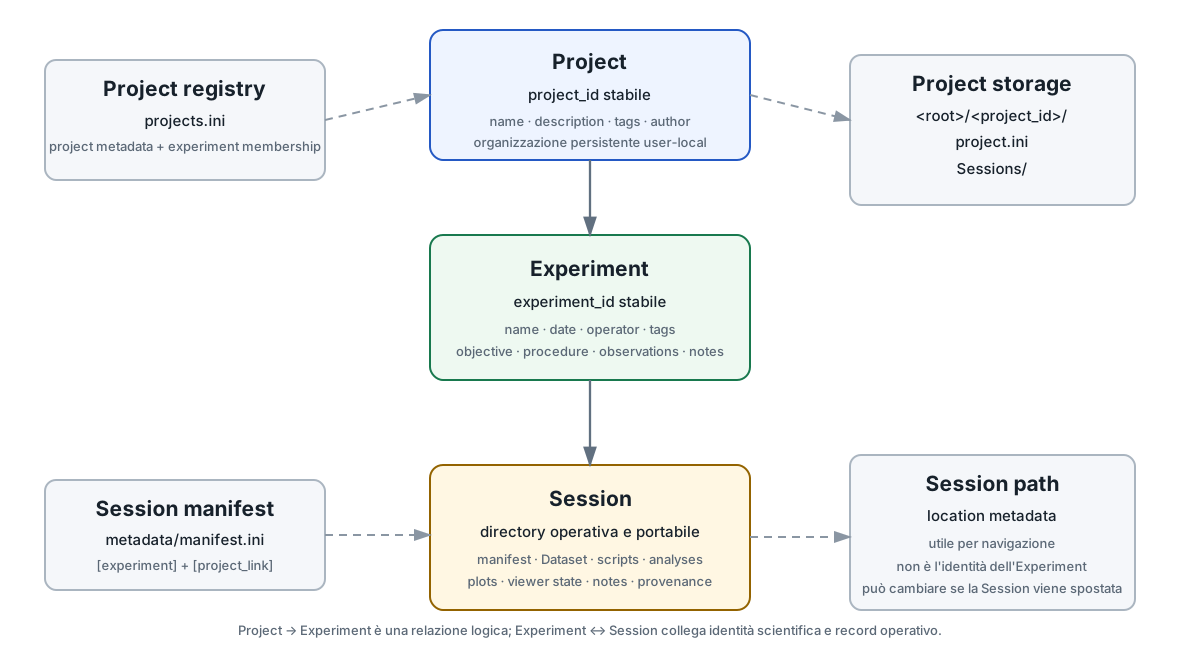
Un Project è una entità persistente sopra gli Experiments. Ha un project_id stabile indipendente dal nome modificabile e può contenere metadata come nome, descrizione, tags, autore, data di creazione e aggiornamento.
Il registry autorevole dei Projects è user-local e segue la configurazione XDG/home del framework. La dev-031 mantiene anche uno storage stabile del Project con un piccolo project.ini e una directory Sessions/.
3. Experiment: identità scientifica e notebook
L'Experiment rappresenta lo studio/esperimento descritto nella Session. Il Manifest Format 2 conserva campi come:
name
date
operator
tags
notes
objective
procedure
observations
La dev-031 assegna inoltre un experiment_id stabile. Il Project membership usa questo ID, non il nome visibile e non il path della Session.
Informazioni specifiche degli strumenti appartengono agli Instrument Module instances; le variabili scientifiche appartengono ai Dataset/Variable Schema. L'Experiment rimane il livello descrittivo del lavoro.
4. Session: il record operativo e portabile
La Session conserva configurazione, Dataset, source files, note, script registrati, output Analysis, plots, Viewer state e provenance. Il suo metadata/manifest.ini contiene sia la sezione [experiment] sia il collegamento persistente al Project.
[project_link]
api_version=1
experiment_id=experiment-...
project_id=project-...
legacy_project=
Il path della Session viene registrato anche nel Project membership per consentire la navigazione. Non sostituisce però experiment_id.
5. Perché il Session path non è l'identità dell'Experiment
Una Session può essere spostata. Quando una Session collegata a un Project viene riaperta, GX-TXT può aggiornare il “last known Session path” nel membership index usando l'experiment_id stabile.
Questo permette di distinguere:
- identità: l'Experiment continua ad essere lo stesso;
- localizzazione: la directory dalla quale quella Session è stata aperta può cambiare.
6. Creare una nuova Session dentro un Project
Nella dev-031 la creazione di una nuova Session può ricevere direttamente un projectId. In questo caso la Session viene creata sotto lo storage stabile del Project:
<Session/Project root>/
└── <project_id>/
    ├── project.ini
    └── Sessions/
        └── <session_name>/
            ├── metadata/
            ├── analysis/
            ├── raw/
            └── ...
GX-TXT genera contestualmente un nuovo experiment_id, imposta il project_id nel manifest e registra l'Experiment nel membership del Project.
7. Associare una Session esistente a un Project
È un'operazione diversa dalla creazione “dentro” il Project. Quando la Session esiste già, Associate current Session... crea/aggiorna il collegamento logico fra l'Experiment corrente e il Project scelto.
La directory esistente non viene spostata e i dati non vengono copiati. Il membership registra il path corrente per consentire di riaprire la Session dal Project.
8. GUI corrente: Experiment e Projects
8.1 Nella scheda Experiment
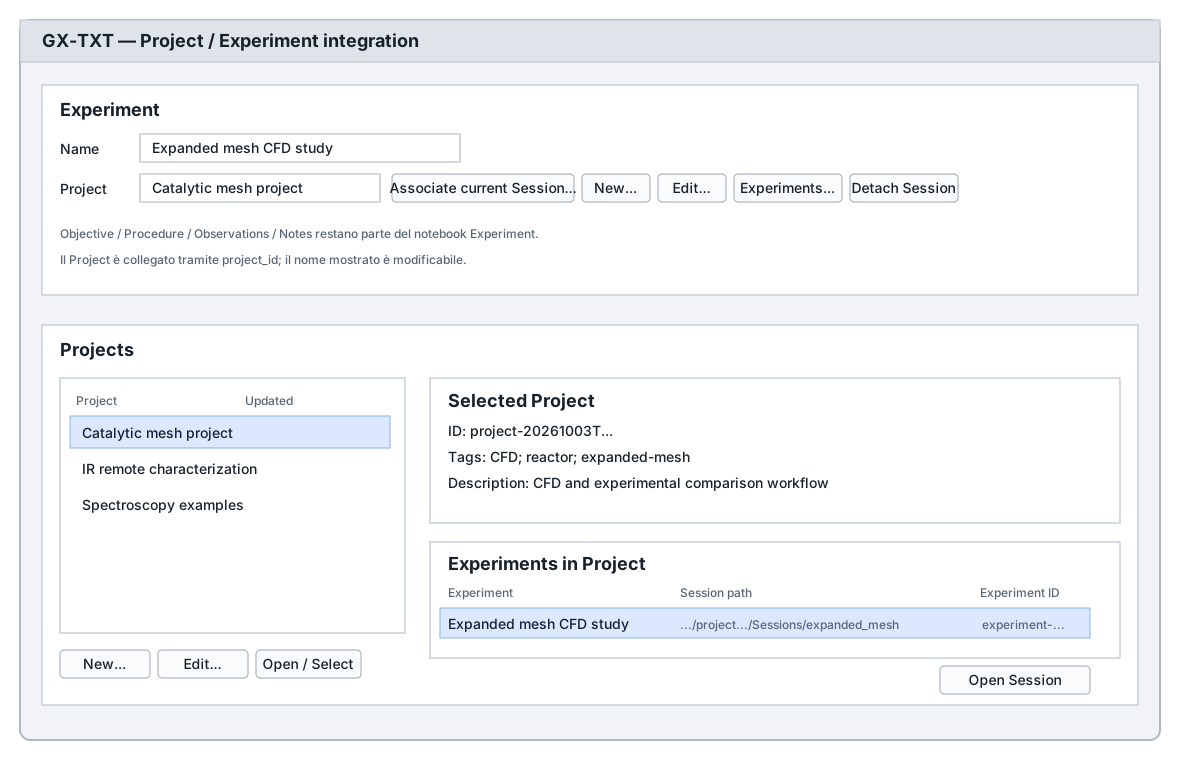
La riga Project espone:
- Associate current Session... — sceglie un Project persistente e collega l'Experiment corrente;
- New... — crea un nuovo Project; con una Session aperta lo associa anche all'Experiment corrente;
- Edit... — modifica metadata del Project selezionato;
- Experiments... — mostra gli Experiments appartenenti al Project e permette di aprire la Session registrata;
- Detach Session — rimuove la membership senza cancellare dati.
8.2 Nel tab Projects
Il tab Projects è una proiezione dello stesso backend persistente. Mostra la lista dei Projects, metadata del Project selezionato, gli Experiments associati e consente di navigare alle Session quando il path registrato è disponibile.
9. Detach è non distruttivo
Detach Session rimuove il collegamento fra l'experiment_id e il Project. Non cancella:
- la Session;
- RAW source;
- Dataset;
- analisi e risultati;
- plots o Viewer state;
- script o provenance.
La GUI chiede esplicitamente conferma specificando che nessun dato scientifico verrà eliminato.
10. Modificare il nome del Project non ne cambia l'identità
Il nome è metadata editabile. La membership usa project_id. Rinominare un Project non richiede di rinominare gli Experiments né le Session e non cambia le identità scientifiche.
Analogamente, la lista degli Experiments usa experiment_id come autorità; nome e Session path servono alla presentazione e alla navigazione.
11. Legacy Project text
I manifest storici potevano contenere soltanto experiment.project come testo libero. La dev-031 non interpreta automaticamente quel testo come una identità Project persistente.
Quando l'utente associa esplicitamente l'Experiment a un Project moderno, il vecchio testo può essere conservato in legacy_project. In questo modo una semplice coincidenza di nomi non crea una membership non richiesta.
12. Registry Project e manifest Session devono restare allineati
La relazione è registrata in due punti con ruoli diversi:
| Posizione | Cosa conserva |
|---|---|
| Project registry user-local | Project metadata e membership per experiment_id, incluso l'ultimo Session path noto. |
Session metadata/manifest.ini | experiment_id, project_id e legacy text della Session aperta. |
Il salvataggio e l'apertura della Session sincronizzano il collegamento attraverso le API di Project. Non è necessario modificare manualmente nessuno dei due file.
13. Esempio: progetto con più Experiments
Project: Catalytic mesh reactor
project_id = project-...

├── Experiment A
│   experiment_id = experiment-A...
│   Session = CFD_simple_mesh
│   Datasets = mesh + pressure + velocity
│
├── Experiment B
│   experiment_id = experiment-B...
│   Session = CFD_SEM_reference
│   Datasets = detailed geometry + CFD results
│
└── Experiment C
    experiment_id = experiment-C...
    Session = laboratory_measurements
    Datasets = chromatography + UV + pH + temperature
Le tre Session possono essere navigate dallo stesso Project senza mescolare i loro Dataset registry o la loro provenance.
14. Project, Dataset e risorse Session: cosa appartiene a cosa
| Oggetto | Project | Experiment / Session |
|---|---|---|
| Project metadata | ✓ autorevole | solo riferimento project_id |
| Experiment identity | membership via experiment_id | ✓ autorevole nel manifest |
| Dataset | non duplicato | ✓ Session |
| RAW | non duplicato | ✓ Session |
| Analysis / plots | non duplicati | ✓ Session |
| Script snapshots | non duplicati | ✓ Session |
| Session path | ultimo path noto per navigazione | directory fisica corrente |
15. Cosa succede con Portable Session
Una Session esportata mantiene le proprie identità scientifiche e il link Project presente nel manifest. Il package portabile conserva il record Session; il Project registry user-local non viene trasformato in un secondo contenitore dati dentro ogni archivio.
Dopo la relocazione, aprire la Session permette al framework di aggiornare le informazioni di navigazione legate all'experiment_id quando il relativo Project è disponibile.
16. Regole pratiche
- Usa il Project per raggruppare lavori correlati, non per duplicare Dataset.
- Considera
project_ideexperiment_idle identità persistenti; nomi e path possono cambiare. - Se vuoi che una nuova Session viva fisicamente sotto un Project, sceglilo al momento della creazione.
- Se la Session esiste già, associa l'Experiment: non serve spostarla.
- Usa Detach per rimuovere l'organizzazione, non per cancellare risultati.
- Non modificare manualmente
projects.inio[project_link]durante il normale uso.
17. Guide collegate
- Introduzione a GX-TXT — architettura generale.
- Session Explorer e risorse — contenuto operativo della Session.
- Dataset e Variable ID — identità dei dati dentro la Session.
- Octave & Python Script Workspaces — script Session-owned.
Riferimento tecnico completo
Questa parte raccoglie integralmente la documentazione tecnica pertinente distribuita con GX-TXT per gli argomenti e i moduli trattati in questa pagina.
GX-TXT Project API v1
GX-TXT Project API v1
SPDX-License-Identifier: GPL-3.0-or-later
Purpose
Project API v1 adds a persistent organizational entity above Experiment:
Project
  -> one or more Experiments
      -> Datasets / analyses / plots / viewers / results
A Project groups Experiments. It does not own or duplicate their scientific payloads, and assigning a Project never moves a Session directory.
Persistent identity and metadata
Each Project has a stable project_id independent from
its editable name. Persistent metadata includes:
project_id;name;description;tags;author;created_at;updated_at.
The user-local authoritative registry is projects.ini
under the same GX-TXT XDG configuration root used by other persistent
framework configuration. The file is UTF-8, deterministic and
human-readable.
Experiment identity and membership
Project membership uses a persistent experiment_id, not
a Session path or display name. A membership records the Project ID and
the last known Session path and Experiment name for navigation.
The Session manifest carries a [project_link] section
containing:
[project_link]
api_version=1
experiment_id=experiment-...
project_id=project-...
legacy_project=
The Session path is therefore location metadata, not Experiment identity. Opening a Project-linked Session refreshes the user-local membership index by stable Experiment ID, allowing the recorded path to follow a moved Session when that Session is opened again.
Historical
experiment_project compatibility
Manifest Format 2 continues to write the historical
experiment.project field for backward compatibility. For a
persistent Project it contains a display-name snapshot only;
project_link.project_id is the authoritative identity.
A pre-0.9.7.66 manifest with only experiment.project is
not converted automatically into a Project. The old
text is exposed as legacy project text and remains recoverable. When the
user explicitly associates that Experiment with a persistent Project,
GX-TXT stores the old text in project_link.legacy_project
before setting the new Project ID.
Detaching restores preserved legacy text where one exists. It never deletes the Session, Dataset, RAW source, plot or analysis result.
Public Tcl operations
The core API includes the following practical entry points:
projectRegistryPath
projectLoadRegistry
projectSaveRegistry
projectIds
projectGet
projectField
projectExists
projectCreate
projectUpdate
projectAssociateExperiment
projectDetachExperiment
projectListExperiments
projectAssociateCurrentExperiment
projectDetachCurrentExperiment
projectCurrentId
projectCurrentDisplay
projectSynchronizeCurrentExperiment
projectCreate and projectUpdate persist
metadata immediately. Current-Experiment association/detachment updates
both the persistent Project membership registry and the Session
manifest.
GUI integration
The Experiment tab replaces the unrestricted Project text entry with a compact persistent Project row:
Project: [current project / legacy text / none]
         [Select...] [New...] [Edit...] [Experiments...] [Detach]
Experiments... lists the Experiments currently
associated with the selected Project and can open an available recorded
Session path.
Persistence and deletion semantics
Project state is authoritative user state, not runtime/cache. Project API v1 does not implement Project deletion. This avoids expanding the first implementation into destructive lifecycle management. Removing or changing an Experiment association is non-destructive and affects only organizational metadata.
Scope
Project API v1 is generic. It contains no CFD-specific fields and no Instrument Library. Future CFD and laboratory workflows may use Projects as containers without changing the Project identity model.
Project and Session storage
Project and Session storage
The configured Session / Project root is the normal creation
location. A new Project receives a stable ID independent of its display
name and a directory <root>/<project-id>/. Its
project.ini stores descriptive metadata;
Sessions/ contains new Sessions created for that Project.
The user registry records the Project’s storage path so renaming or
changing the configured root does not move an existing Project.
The New Session dialog offers Standalone Session and
every registered Project. Standalone Sessions are created directly under
the configured root. Project Sessions are created under that Project’s
Sessions/ directory and linked by Project and Experiment
IDs in the Session manifest and membership registry. The Projects page
also offers New Session in Project… for its selected
Project.
Previously associated Sessions keep their existing paths. The framework does not relocate data when an Experiment is associated with or detached from a Project. Existing Projects without a stored path acquire a Project directory only when a new Session is created for them.
Projects GUI
Projects GUI
GX-TXT 0.9.7.68 adds a Projects notebook tab immediately after Experiment. The tab is a GUI projection of the existing Project API v1 introduced in GX-TXT 0.9.7.66; it does not introduce a second Project backend.
The tab provides:
- the persistent Project list;
- selected Project name, ID, description, tags, creation time and update time;
- Project creation and editing through the existing Project metadata dialogs;
- Open / Select to associate the current Experiment with the selected Project;
- the Experiments belonging to the selected Project;
- navigation to an Experiment Session when its recorded path is available;
- explicit Experiment detachment without deleting any Session or scientific data.
Project membership remains a logical relationship. Projects do not move Sessions and do not duplicate RAW sources, canonical Datasets, analyses, plots or Viewer state.