Indice
Versione verificata
| Framework | GX-TXT 0.9.8.10-dev-031 |
|---|---|
| 3D Geometry | acq.geometry_3d 1.1.0 |
| Images | acq.image_binary 1.2.0 |
acq.pdf_document 1.0.1 | |
| Text / Source | acq.text_document 1.0.4 |
1. Un modello comune
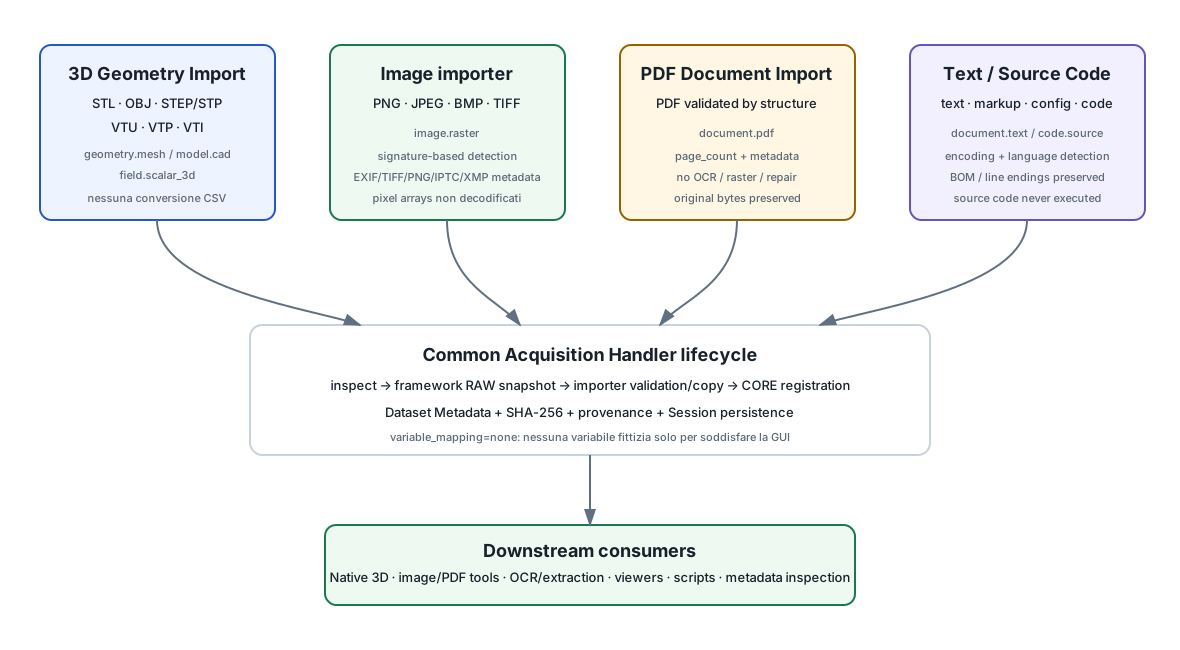
La maggior parte usa variable_mapping=none: non vengono create variabili artificiali per byte, pagine, facce o righe solo per adattare il contenuto al modello tabellare.
2. 3D Geometry Import
acq.geometry_3d importa batch misti dei formati:
| Formato | Contract | Controllo principale |
|---|---|---|
| STL | geometry.mesh | ASCII/binary mesh envelope, triangle records, coordinate finite, bounds. |
| OBJ | geometry.mesh | vertex/face/line/point records e indici. |
| STEP/STP | model.cad | ISO 10303-21 envelope e sezioni obbligatorie; niente decoding completo CAD. |
| VTU | geometry.mesh | VTK XML UnstructuredGrid e array declarations. |
| VTP | geometry.mesh | VTK XML PolyData e topology/array declarations. |
| VTI | field.scalar_3d | ImageData 3D, extent, origin, spacing e scalar arrays. |
2.1 Nessuna conversione geometrica in acquisizione
Il modulo non esegue mesh repair, resampling, triangolazione implicita, coordinate conversion, CAD tessellation o field extraction. Il canonical payload resta byte-identical al file preservato.
2.2 Preview e Native 3D
La Preview presenta metadata, validation level e warnings; non genera necessariamente una thumbnail tessellata. Dopo import, Native 3D seleziona il Dataset direttamente dalla Session. VTI richiede array scalare e isovalue espliciti.
2.3 Dipendenze esterne OBJ
I riferimenti mtllib vengono elencati ma material/texture esterni non vengono copiati o scaricati automaticamente. La geometria resta preservata, mentre le dipendenze visuali esterne non diventano portabili per magia.
3. Image importer
acq.image_binary importa PNG, JPEG, BMP e TIFF come image.raster.
- Riconoscimento per firma contenuto, non sola estensione.
- Byte RAW autorevoli e canonical payload opaco.
- Metadata tecnici: dimensioni, mode/bands, frame count, alpha, DPI dove disponibili.
- Metadata estesi: EXIF/TIFF, PNG text, IPTC, XMP e alias comodi per camera/date/exposure/ISO.
- Nessun decoding intenzionale dell'array pixel nell'acquisition module.
L'estrazione metadata estesa usa Python/Pillow quando disponibile, ma il percorso base signature-based resta indipendente da Pillow.
4. PDF Document Import
acq.pdf_document importa ogni PDF come un Dataset indipendente document.pdf.
Il contract garantisce:
- payload PDF strutturalmente leggibile;
- byte preservati;
- Dataset ID stabile;
- SHA-256 provenance;
document.format=PDF;document.page_count >= 1.
4.1 Cosa non garantisce
Non implica automaticamente testo estraibile, OCR, pagine raster, title/author presenti o documento non cifrato.
L'importatore non esegue OCR, text extraction, rasterizzazione, repair, optimization o annotation.
4.2 Metadata PDF
Quando disponibili può registrare pdf.version, pdf.encrypted, title, author, subject, keywords, creator/producer e date.
I workflow OCR e di estrazione appartengono a consumer separati, non all'acquisizione.
5. Text and Source Code Import
acq.text_document importa testo, markup, configurazioni e source code come:
document.text;code.source, specializzazione didocument.text.
Original bytes, encoding, BOM, tabs e line endings vengono preservati. Il source code non viene mai eseguito, importato come modulo, compilato o seguito nelle sue dipendenze.
5.1 Language detection
Il modulo può riconoscere Python, Tcl, Octave/MATLAB, C/C++, shell, PowerShell, JavaScript/TypeScript, Fortran, Rust, Go, R, Julia, Ruby, Perl, Lua, PHP, SQL, Make/CMake, JSON/YAML/TOML/INI/XML/HTML/CSS/Markdown/TeX e altri casi dichiarati.
La detection usa estensione/nome, shebang, modeline e firme limitate del contenuto. È un metadata hint, non validazione sintattica.
5.2 Import as e Language sono indipendenti
Un file Python può essere preservato come document.text oppure code.source mantenendo comunque code.language=python.
5.3 Encoding
Auto controlla BOM, Python coding cookie e UTF-8; sono disponibili override espliciti per UTF-16/32, cp1252, ISO-8859-1 e altri valori dichiarati dal modulo.
Gli override Language/Encoding si applicano al run corrente; riportali ad auto prima di un batch misto se non vuoi forzare tutti i file allo stesso modo.
6. Copy into Session e RAW esterno
Per text/source il framework offre anche la possibilità di mantenere/riferire l'originale esterno come RAW quando esplicitamente scelto; la copia in Session resta il comportamento normale. Le risorse esterne vanno verificate attraverso le funzioni pubbliche di metadata/integrità, non date per permanenti.
7. Perché non creare finte Variables?
Una geometria STEP, un'immagine JPEG o un PDF non sono tabelle solo perché GX-TXT supporta tabelle. Questi importatori dichiarano variable_mapping=none e mantengono un contract file-shaped appropriato.
Un consumer successivo può creare un Dataset numerico derivato quando esiste una trasformazione scientifica esplicita: per esempio OCR, digitalizzazione, estrazione tabella o decoding.
8. Preservazione e provenance
Acquisition Handler API lascia a CORE:
- RAW snapshot;
- Dataset Registry;
- SHA-256;
- Dataset Metadata lifecycle;
- duplicate-ID protection;
- rollback delle importazioni fallite.
Il plugin riconosce il formato, valida ciò che è nel suo scope, produce/copia il canonical payload e restituisce un descriptor. Non deve scrivere direttamente metadata/datasets.ini.
9. Limiti di validazione non equivalgono a certificazione scientifica
Per STEP e VTK, per esempio, l'importatore può verificare envelope e metadata strutturali senza decodificare ogni entità CAD o ogni array scientifico. Un import riuscito significa che la sorgente è stata riconosciuta e preservata secondo il validation scope dichiarato; non che qualunque consumer futuro sia obbligato a poterla renderizzare.
10. Guida rapida alla scelta
| Sorgente | Importer | Contract |
|---|---|---|
| STL / OBJ / VTU / VTP | 3D Geometry Import | geometry.mesh |
| STEP / STP | 3D Geometry Import | model.cad |
| VTI scalar field | 3D Geometry Import | field.scalar_3d |
| PNG / JPEG / BMP / TIFF | Image importer | image.raster |
| PDF Document Import | document.pdf | |
| Testo / markup / config | Text and Source Code Import | document.text |
| Source code | Text and Source Code Import | code.source |
11. Guide collegate
Riferimento tecnico completo
Questa parte raccoglie integralmente la documentazione tecnica pertinente distribuita con GX-TXT per gli argomenti e i moduli trattati in questa pagina.
3D Geometry Import
3D Geometry Import
Module: acq.geometry_3d ·
Version: 1.1.0 · Baseline: GX-TXT
0.9.8.10-dev
Install and import
Open Modules → Install plugin… and select
acq.geometry_3d_1.1.0.zip. Select 3D Geometry
Import in Acquisition. Use Browse… to select
the first source, then Add sources… for additional
files. Edit the Dataset IDs in the framework’s batch table, enable the
wanted rows, and run acquisition. To extend an open Session, use the
existing Import enabled pending into current Session
action. Imported rows retain their normal Imported/Pending status.
One input file produces one independent Dataset. Mixed-format batches
are supported. STL, OBJ, VTU and VTP produce geometry.mesh;
STEP/STP produce model.cad; VTI produces
field.scalar_3d. The returned format determines the
contract even in a mixed batch. No primary Dataset, source-variable
mapping or analysis module is required.
The importer uses the Python executable configured in GX-TXT Runtime Tools. Python 3.10 or newer and its standard library are required. No pip packages, VTK Python bindings, OCCT, NumPy, Octave or viewer activation is needed for import. The native viewer has its own separate runtime requirements.
Supported sources and what is checked
| Source | Canonical extension | Import inspection |
|---|---|---|
| STL ASCII | .stl |
Triangle grammar, finite coordinates/normals, closed solids; triangle count and bounds. |
| STL binary | .stl |
Exact count/record-length layout, finite coordinates/normals;
triangle count and bounds. Binary files whose header begins with
solid are supported. |
| Wavefront OBJ | .obj |
Mesh vertex/face/line/point records, finite numeric coordinates and positive/negative index references. Polygon records are preserved, not triangulated. |
| STEP / STP | .step |
ISO 10303-21 opening/closing envelope, mandatory HEADER declarations and DATA section delimiters. CAD entities and topology are not decoded or validated. |
| VTU | .vtu |
VTKFile type="UnstructuredGrid", XML structure, piece
counts, point/cell array declarations, appended-data envelope and raw
offset bounds. Inline ASCII/binary and appended raw/base64 containers
are accepted. Scientific array values, topology and compressed blocks
are not decoded or validated. |
| VTP | .vtp |
VTKFile type="PolyData", piece point/cell counts,
coordinate and topology array declarations, appended-data envelope and
raw offset bounds. Atom-like point arrays and indexed lines remain in
the source payload. Array values and connectivity are decoded by the
native VTK reader at render time. |
| VTI | .vti |
VTKFile type="ImageData", nondegenerate 3-D extent,
finite origin/spacing, numeric array declarations and appended-data
envelope. Scalar values and compressed blocks are decoded by the native
VTK reader at render time. |
The exact inspection scope is stored in
geometry.validation_level. A successful STEP/VTK XML import
means that the checked container can be preserved and registered; it
does not certify that every CAD entity or scientific payload can be
decoded. VTK/OCCT consumers may still report malformed or unsupported
payload content.
The extension is a chooser hint, not proof of format. STL/OBJ/STEP
content with a mismatched extension generates a warning and receives the
canonical extension. VTK XML files must use the extension matching their
declared grid type. The original filename is retained. .stp
and .step share the same STEP format; renaming the
canonical extension does not rewrite any bytes.
Other formats, such as legacy .vtk, .pvtu,
.pvd, IGES, PLY, GLTF or OpenFOAM case directories, are not
advertised by this plugin. It does not claim support merely because a
third-party library can read a format.
Preview and viewing
The plugin supplies metadata, validation scope and warnings through the acquisition Preview contract. It does not launch a renderer or generate a tessellated thumbnail. On large OBJ/STL text files the initial preview may use bounded inspection; import performs the full record checks. Complete imported metadata is available through the normal Dataset Metadata workspace. The Variables workspace is intentionally empty: these are opaque geometry objects, not artificial CSV tables.
Known baseline Preview limitation: in GX-TXT
0.9.8.09, the final generic binary safety guard can intercept binary
STL, raw-appended VTU and other binary-looking sources before the plugin
inspection callback is displayed. Such pending sources show a safe
generic binary preview instead of the plugin metadata. Textual OBJ,
ASCII STL, STEP and textual VTU normally reach the plugin preview.
Acquisition still uses the handler and persists its metadata. After
import, the normal registered-Dataset preview displays that metadata.
This package does not override or patch CORE functions to bypass the
guard; the small future integration point is documented in
docs/CORE_EXTRACTION.md.
After import, open Native 3D and choose the canonical Dataset from
the Session selector. Opening the viewer does not open a filesystem
chooser. STL/OBJ/STEP use its geometry worker; VTU/VTP/VTI use its
shared VTK scientific scene. VTI needs an explicit scalar array and
semicolon-separated isovalues. Source point/cell arrays, connectivity,
units and compressed data remain in the original payload. The importer
records array declarations in vtu.arrays_json,
vtp.arrays_json or vti.arrays_json without
converting them to artificial tabular Dataset variables.
Preservation, units and dependencies
The framework makes its normal RAW snapshot. The plugin inspects that exact snapshot and writes a byte-identical canonical payload. Copy verification is performed before success; the framework independently computes source and canonical SHA-256, registers the Dataset and commits its metadata. Save/reopen uses ordinary Dataset Registry and Dataset Metadata APIs. Imported files remain inside the Session, independent of the original source location.
There is no mesh repair, simplification, resampling, implicit triangulation, coordinate conversion, CAD tessellation or scientific field extraction. No unit is guessed or assigned to a source. Embedded units remain in the preserved file. STL/OBJ bounds are inspection metadata, not a transformation of the source.
OBJ mtllib references are listed and warned about.
Material files and textures are not copied or fetched:
the mesh geometry is preserved, but external appearance dependencies are
not made portable. Sources and referenced files are never executed. VTK
XML DTDs/entities and network resource resolution are rejected.
The RAW snapshot and canonical payload normally consume two copies of the source size, plus small metadata. The plugin does not bypass the framework’s storage/provenance lifecycle with private links or storage tables.
Progress and failure behavior
Inspection and preservation run in a separate Python process. The Tcl adapter waits through the event loop and forwards progress/cancellation through the Acquisition Handler callbacks. The optional begin/step/cancel callbacks support framework cooperative acquisition. Cancellation waits for the worker to close its files before rollback; this also avoids removing open destinations on Windows.
The framework still owns RAW snapshot creation and registry hashing. Those framework-controlled phases retain their existing responsiveness; this plugin does not alter CORE to add a new batch scheduler.
Malformed sources are rejected with diagnostics. Invalid IDs, destination collisions and import/metadata failures use the existing framework transaction. The importer never overwrites an existing payload. It creates files only within the provided output directory and does not edit Dataset registries or metadata sidecars itself.
Inspections use bounded records (16 MiB per text record), a 2 MiB STEP header window, and a 4096-array metadata listing limit for VTK XML. The latter truncates only the descriptive listing, with an explicit omitted count; original arrays are never dropped. Very unusual text records or STEP headers above these limits receive an explicit diagnostic rather than an unbounded allocation.
Code organization and future CORE extraction
portable/formats.json is the format catalogue.
portable/geometry_probe.py is a framework-neutral
inspector. They are explicitly marked CORE EXTRACTION
CANDIDATE, contain no registry writes and can move together
without carrying the GUI, package installer, Tcl adapter or a native
renderer. See docs/CORE_EXTRACTION.md for the small
interface and migration boundary.
runtime/geometry_worker.py handles the application
process protocol and exact copy.
runtime/acquisition_handler.tcl translates public
Acquisition requests and returns normal Dataset descriptors.
module.ini declares contracts and the Acquisition Format
Registry entries through the existing public mechanism. There are no SQL
tables, private Dataset registries, CORE overrides or installer scripts.
The distributed ZIP contains only this plugin.
Tests
Run python -B tests/test_probe.py from the extracted
package. The fixture files are self-authored small examples.
envelope.step / envelope.stp test the
explicitly limited STEP envelope scope; they are not a tessellated
solid.
The integration and GUI test scripts accept an expendable
extracted framework and the plugin ZIP. Do not run them against
your production installation. See TEST_RESULTS.md for
executed checks and limitations.
3D Geometry Import 1.1.0
3D Geometry Import 1.1.0
Install acq.geometry_3d_1.1.0.zip using GX-TXT
Modules → Install plugin…. Use 3D Geometry
Import in Acquisition for STL, OBJ, STEP/STP, VTU, VTP and VTI
files. Each file becomes a normal source-preserving Dataset, including
metadata and provenance. No CORE files are included or modified.
The importer package requires GX-TXT 0.9.8.09 or newer and a configured Python 3.10+ executable. The Dataset-driven Native 3D workflow requires GX-TXT 0.9.8.10-dev or newer. No additional Python package or viewer is required for import.
See MANUAL.md for the workflow and precise
format-validation scope, docs/CORE_EXTRACTION.md for the
isolated reusable components, and TEST_RESULTS.md for
validation performed on the supplied baseline.
The Native 3D viewer selects imported Datasets directly from the Session. For VTI, enter a scalar array name and one or more isovalues before rendering. OBJ external materials/textures are not bundled automatically. Geometry and scientific payloads are preserved without transformations or CSV conversion.
License: GNU GPL version 3 or later. All source code is included.
acq.image_binary
acq.image_binary
GX-TXT CORE module for importing binary raster image files.
Features
- Imports PNG, JPEG, BMP and TIFF as opaque
image.rasterbinary Datasets. - Detects the format from content signatures rather than trusting the filename extension.
- Re-validates the framework-owned RAW snapshot during import and keeps RAW bytes authoritative.
- Publishes persistent structured metadata through Dataset Metadata
API v1 using the Acquisition Handler
structured_metadatahandoff introduced in GX-TXT 0.9.7.38. - Reads technical metadata such as dimensions, mode, bands, frame count, alpha and DPI when available.
- Reads available EXIF/TIFF tags, PNG textual metadata, IPTC fields, XMP packet data and selected container information.
- Preserves common image fields with convenient aliases such as camera make/model, capture date, orientation, software, exposure, ISO and lens information when present.
- Does not store opaque binary ICC/EXIF/Photoshop profile payloads in Dataset Metadata; only their sizes are recorded where useful.
- Does not intentionally decode image pixel arrays. The canonical Dataset remains the original opaque image bytes.
- Extended metadata extraction is fail-soft: if Python/Pillow is unavailable or a metadata parser rejects a file, signature-based import still works and basic source/format metadata is retained.
- No Tk dependency; the acquisition handler remains host-independent.
Runtime dependency for extended metadata
Extended metadata extraction uses the module-owned
runtime/image_metadata.py helper and requires Python 3 (or
Python) with Pillow. The GX-TXT server environment already used for
image/PDF processing provides Pillow. The core binary import path itself
does not require Pillow.
Persistent metadata examples
Typical keys include:
source.original_filename
source.file_size_bytes
image.format
image.media_type
image.width_px
image.height_px
image.mode
image.camera_make
image.camera_model
image.datetime_original
image.orientation
image.exif.root.271_make
image.exif.exif.36867_datetimeoriginal
image.text.title
image.iptc.caption
image.xmp.packet
Unknown or format-specific fields remain namespaced metadata; CORE does not interpret their semantics.
License
SPDX-License-Identifier: GPL-3.0-or-later
PDF Document Import — Manual
PDF Document Import — Manual
Purpose
acq.pdf_document imports Portable Document Format files
as normal GX-TXT canonical Datasets. The acquisition boundary is
intentionally narrow:
PDF source
→ content/structure validation
→ original bytes preserved
→ document metadata
→ document.pdf Dataset
One source PDF always corresponds to one Dataset. Multiple selected PDFs therefore create multiple independent Datasets rather than one merged document.
Dataset contract
The plugin provides the contract:
document.pdfA valid document.pdf Dataset guarantees only:
- a structurally readable PDF payload;
- byte-for-byte preservation of the imported source snapshot;
- a stable GX-TXT Dataset ID;
- canonical GX-TXT SHA-256 provenance;
document.format=PDF;document.page_count >= 1.
The Dataset does not imply an extractable text layer, searchable text, rendered pages, a title, an author, unencrypted content or any OCR result.
Single import
Choose Acquisition → PDF Document Import, select a source, confirm the Dataset ID and run the acquisition. GX-TXT owns the RAW snapshot, Dataset registration, SHA-256 provenance and Session persistence. The plugin validates and copies only the authoritative preserved PDF bytes into the canonical Dataset payload.
Multiple / batch import
The module declares normal Acquisition Handler batch capability. Use the framework source-batch table to add one or several PDFs, including multi-select where available. Each enabled row has its own editable Dataset ID and becomes one independent Dataset.
Suggested Dataset IDs are derived from filenames by the existing GX-TXT batch UI and are not the technical identity of the source file. The original filename is preserved as metadata.
Duplicate Dataset IDs must be resolved before they can coexist in one Session.
Validation
A .pdf extension is not trusted. The importer requires a
PDF header signature and successful structured parsing sufficient to
establish the mandatory page count. A non-PDF renamed to
.pdf, a fatally truncated document, or a zero-page unusable
document is rejected.
A valid PDF stored under a non-.pdf filename is accepted
when selected through a workflow that permits it, because content is
authoritative.
The inspection backend is Python pypdf, called directly
with an argv list. The source file is never passed through shell
interpolation.
Original source preservation and integrity
The framework creates its normal RAW acquisition snapshot. The plugin revalidates that exact RAW file, copies it byte-for-byte to the canonical Dataset payload and verifies:
SHA256(source at import)
=
SHA256(framework RAW snapshot)
=
SHA256(canonical PDF payload)
If the selected source changes while import is in progress, the import fails explicitly.
Authoritative SHA-256 values are stored by the existing Dataset
Registry fields source_sha256,
canonical_sha256 and sha256. The plugin
therefore does not duplicate the source hash as a second Dataset
Metadata key.
Dataset Metadata
Contract-required document/provenance properties are represented through the existing Dataset Registry plus Dataset Metadata. The mandatory Dataset Metadata keys are:
document.format=PDF
document.page_count=<integer >= 1>
source.filename=<original filename>
source.size_bytes=<original byte count>
The source SHA-256 is mandatory provenance but is stored in the
canonical Dataset Registry rather than duplicated as a Dataset Metadata
key. The importer currently also records pdf.version and
pdf.encrypted when the inspection backend establishes them;
these remain optional contract metadata and consumers must not require
them. Other optional metadata is written only when actually
available:
pdf.version
pdf.encrypted
pdf.title
pdf.author
pdf.subject
pdf.keywords
pdf.creator
pdf.producer
pdf.creation_date
pdf.modification_date
Missing optional metadata never invalidates an otherwise valid PDF Dataset.
Encryption policy
Encryption is a property of document.pdf, not a separate
Dataset contract.
If an encrypted PDF can be inspected without a supplied password and the mandatory page count can be established, import succeeds with:
pdf.encrypted=trueIf encryption prevents establishing the mandatory contract properties, import fails with an explicit diagnostic. The module does not crack passwords, repeatedly prompt for passwords, decrypt the authoritative source or rewrite it.
Invalid or corrupt documents
Fatal structural errors fail the import. The source is treated read-only. The importer never repairs or rewrites malformed PDFs automatically.
Optional metadata failures are fail-soft: the missing optional field is omitted and the valid Dataset may still be imported.
Dataset Metadata and Notes
After import, the document uses the normal GX-TXT Variables → Metadata… and Dataset Notes infrastructure. There is no PDF-private metadata editor and no PDF-private notes store.
Session save / reopen
PDF Datasets are Session-scoped and use the ordinary Dataset Registry and Session storage. On reopen, Dataset IDs, canonical payload paths, hashes, provenance and Dataset Metadata are restored by the existing GX-TXT infrastructure.
Future viewers and transformations
The canonical PDF bytes live inside GX-TXT-managed Session storage. Future consumers can therefore open a PDF Dataset without depending on the original external filesystem path.
A later workflow may perform page rendering, OCR or curve digitalization as a separate transformation, for example:
PDF Dataset
→ select page
→ render derived page resource
→ image / curve consumer
None of those transformations is part of
acq.pdf_document.
Limitations
- No OCR is performed by this acquisition module.
- No text extraction is performed during normal acquisition.
- No page rasterization or thumbnails are generated.
- No PDF repair, optimization, editing or annotation is performed.
- Password entry is not implemented; password-protected PDFs that hide mandatory contract properties are rejected.
- The module requires Python
pypdf.
Public GX-TXT APIs used
- Standard Module API v1
- Acquisition Handler Plugin API v1
- Canonical Dataset API v1
- Dataset Metadata API v1
- Binary Dataset Foundation v1
- Preview Descriptor API v1
- Contract Registry API v1
- Plugin Install API v1
- Documentation API v1
The module uses variable_mapping=none; no fake page,
byte, text, X or Y variables are created.
acq.pdf_document 1.0.1
acq.pdf_document 1.0.1
acq.pdf_document is the native GX-TXT acquisition plugin
for preserved PDF documents.
Each selected source PDF becomes one independent canonical
document.pdf Dataset. The importer validates PDF content
and structure, preserves the original bytes exactly, exposes mandatory
page count and format identity, and publishes available document
metadata through Dataset Metadata API v1.
The module deliberately does not perform OCR, text extraction, page rendering, embedded-image extraction, PDF repair, optimization, editing, annotation or indexing.
Requirements
- GX-TXT 0.9.7.81 or later.
- Python 3.
pypdfavailable to the Python runtime used by GX-TXT.
The validated module is bundled with GX-TXT 0.9.7.81 as CORE / ALWAYS. It is not an externally managed plugin and is not installed from this ZIP by users.
See MANUAL.md for user and architecture details and
TEST_RESULTS.md for validation coverage.
Text and Source Code Import
Text and Source Code Import
Plugin: acq.text_document 1.0.3
Framework baseline: GX-TXT 0.9.8.10-dev
Runtime: framework-configured Python 3.10+, standard
library only.
License: GPL-3.0-or-later.
Install the ZIP with Modules → Install plugin…, then select Text and Source Code Import in Acquisition. Add files in the ordinary source-batch table, adjust Dataset IDs and import. Each source becomes one independent Dataset; no numerical Variables mapping or primary Dataset is required.
Python, Tcl, shell scripts, Octave/MATLAB, C/C++, PowerShell and other source languages are identified from filename/extension, shebang, modeline or a small set of content signatures. Plain text, Markdown, JSON, XML, INI and related configuration documents are supported too. Unknown extensions and extensionless files are accepted when they validate as text. Ambiguous languages are reported explicitly. These hints are not syntax validation.
Original bytes, encoding, BOM, tabs and line endings are preserved in RAW and the canonical payload. Source code is never executed, imported, compiled or registered as a framework plugin. No source dependencies are followed.
Use Variables → select the imported Dataset →
Metadata… to inspect or edit code.language,
detection information, encoding, line counts and your own project
metadata. Use Language override only when automatic
classification needs correction; it applies to every row imported in the
current run. Encoding overrides work the same way. Restore both settings
to auto for normal mixed batches. The pre-import Preview
uses the same current Encoding and Language settings as import.
See MANUAL.html for the complete workflow, language
catalog, metadata schema, encoding and preview limits.
docs/CORE_EXTRACTION.md describes the separated, commented
components suitable for future CORE migration.
TEST_RESULTS.md records the validation actually
performed.
No CORE procedure is replaced. The imported Dataset preview receives the Session path through the public Acquisition Handler callback and reads its persisted fields with Dataset Metadata and Session Inspection APIs. No viewer or other module is required.