Indice
Versione verificata
| Framework verificato | GX-TXT 0.9.8.10-dev-031 |
|---|---|
| Data verifica | 3 ottobre 2026 |
| Bridge contract | OCTAVE_SCRIPT_BRIDGE_API_v1, condiviso dai client GNU Octave e Python |
| Inventario usato | docs/api/SCRIPT_BRIDGE_COVERAGE_v1.json |
1. Prima distinzione: reference pubblica ≠ operazione disponibile al Bridge
Una API reference GX-TXT può descrivere il contratto pubblico completo del provider, comprese operazioni destinate a CORE, Tcl, GUI o moduli nativi. Lo Script Bridge espone soltanto le operazioni per le quali esiste una binding script-callable registrata dal provider.
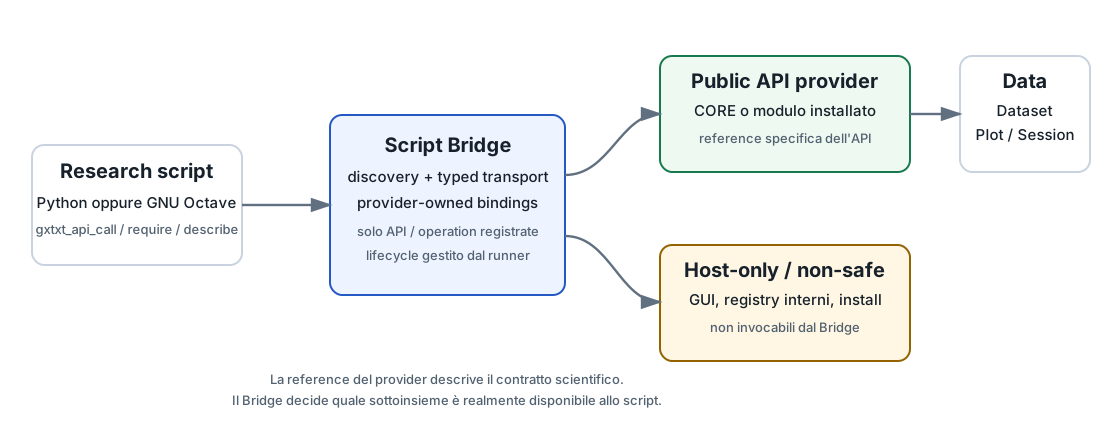
Per questo motivo la domanda corretta non è soltanto «esiste FOO_API_v1?», ma:
- questa API è registrata per lo Script Bridge corrente?
- la specifica operation che mi serve è registrata?
- provider, versione e capability corrispondono a ciò che richiede il mio script?
- quali sono gli argomenti e il result contract documentati dal provider?
2. Le funzioni generiche del Bridge
Il livello generico è stabile e uguale concettualmente per Python e Octave.
| Funzione | Uso |
|---|---|
gxtxt_bridge_info() | Identità/versione del Bridge, linguaggi supportati e callback contract. |
gxtxt_api_list() | Elenca soltanto le API attualmente registrate come script-callable. |
gxtxt_api_has(api_id) | Test rapido di disponibilità. |
gxtxt_api_describe(api_id) | Descriptor machine-readable: provider, versione, capability, operations, argomenti e result contract. |
gxtxt_api_has_operation(api_id, operation) | Verifica una operation specifica. |
gxtxt_api_require(requirements) | Preflight dichiarativo; fallisce prima del calcolo se il contratto richiesto non è presente. |
gxtxt_api_call(api_id, operation, args) | Invoca l'operation con argomenti posizionali tipizzati. |
gxtxt_context() | Contesto della run: input alias, run ID, script identity, output directory e parametri. |
gxtxt_callback_register() / release() | Callback execution-scoped per le API che le supportano. |
gxtxt_api_describe() conferma se e come quella operazione è esposta al tuo script in quella release.
3. Metodo corretto per leggere una API reference
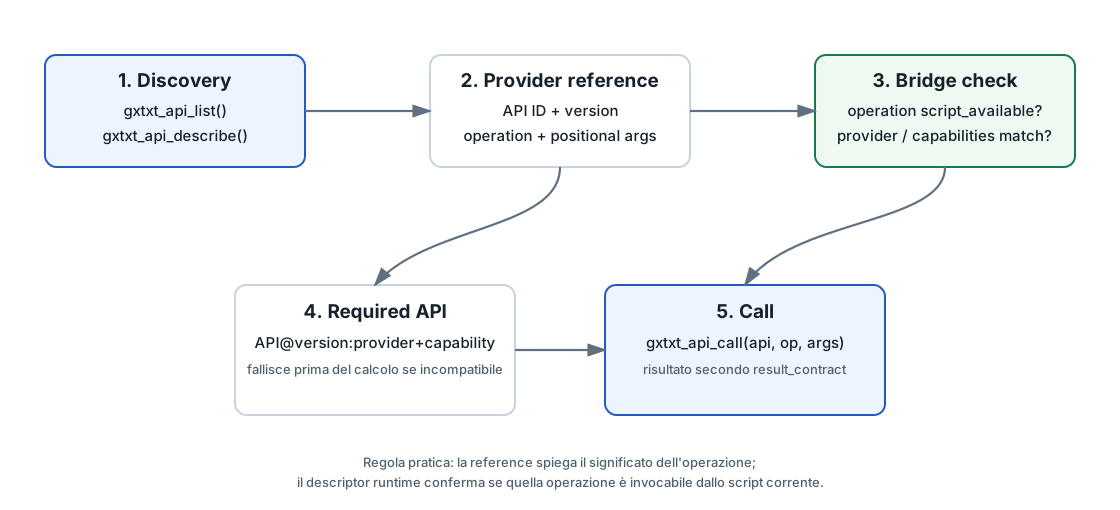
3.1 Identifica API ID e versione
Cerca nella reference l'ID versionato, per esempio CANONICAL_DATASET_API_v2. La versione del contratto è indipendente dalla release GX-TXT.
3.2 Cerca la sezione Script Bridge
Molte reference riportano esplicitamente una sezione Octave Script Bridge o equivalente. Quella sezione è particolarmente importante: descrive le operations esposte, la convenzione degli argomenti posizionali e il risultato visto dallo script.
3.3 Non trasformare automaticamente le firme Tcl in chiamate Bridge
Esempio: la Canonical Dataset API v2 documenta numerose funzioni Tcl per handle, hyperslab e binary transport. Nella dev-031 il Bridge espone invece soltanto:
list()
describe(dataset_id)
read_range(dataset_id, variable_ids, zero_based_start, count)
Quindi una funzione Tcl presente nella stessa reference non diventa automaticamente un nome valido per gxtxt_api_call().
3.4 Controlla gli argomenti strutturati
gxtxt_api_describe() include descriptor delle operations con nome, summary, argomenti strutturati, required status e result_contract. Le opzioni scientifiche, enumerazioni, unità e semantiche restano però responsabilità della reference specifica del provider.
3.5 Controlla provider e capability quando la dipendenza è importante
Se lo script dipende non soltanto dall'ID ma da un provider o da capability specifiche, esprimilo nel preflight anziché affidarti a un controllo manuale.
4. Required APIs: rendere esplicito il contratto dello script
La sintassi compatta è:
API_ID
API_ID@version
API_ID@version:provider_id
API_ID@version:provider_id+capability|capability
Esempi:
CANONICAL_DATASET_API_v2@2
PLOT_DATASET_API_v3@3:plot.dataset+plotspec|render
Il controllo avviene prima del corpo scientifico. Questo è preferibile a scoprire a metà calcolo che un'operazione necessaria non è disponibile.
5. Dalla reference alla chiamata: esempio completo
La reference di CANONICAL_DATASET_API_v2 dichiara per il Bridge l'operation read_range con argomenti:
dataset_id, variable_id_cell/list, zero_based_start, countPython
from gxtxt import (
    gxtxt_api_list, gxtxt_api_describe, gxtxt_api_require,
    gxtxt_api_has_operation, gxtxt_api_call
)

# 1. Runtime discovery
apis = gxtxt_api_list()
desc = gxtxt_api_describe("CANONICAL_DATASET_API_v2")

# 2. Fail before scientific work if the contract is missing
gxtxt_api_require("CANONICAL_DATASET_API_v2@2:canonical_dataset")

# 3. Verify the operation named by the reference
if not gxtxt_api_has_operation("CANONICAL_DATASET_API_v2", "read_range"):
    raise RuntimeError("read_range is unavailable")

# 4. Translate the provider reference literally into positional args
block = gxtxt_api_call(
    "CANONICAL_DATASET_API_v2",
    "read_range",
    ["sample", ["v0001"], 0, 1024],
)
GNU Octave
apis = gxtxt_api_list();
desc = gxtxt_api_describe('CANONICAL_DATASET_API_v2');

gxtxt_api_require('CANONICAL_DATASET_API_v2@2:canonical_dataset');

if (!gxtxt_api_has_operation('CANONICAL_DATASET_API_v2','read_range'))
  error('read_range is unavailable');
endif

block = gxtxt_api_call(
  'CANONICAL_DATASET_API_v2',
  'read_range',
  {'sample', {'v0001'}, 0, 1024}
);
La traduzione è deliberatamente meccanica: API ID e operation sono stringhe esatte della binding; args resta una lista/tupla Python o una cell array Octave nello stesso ordine documentato.
Per una spiegazione didattica delle API più ampie: NUMERIC_API_v1 e SIGNAL_API_v1.
6. Reference utilizzabili con lo Script Bridge nella dev-031
La tabella seguente non sostituisce le reference specifiche: serve a sapere quali reference vale la pena consultare da uno script e quali operations risultano esposte nella copertura verificata.
| API reference | v | Provider | Operations bridged | Quando consultarla |
|---|---|---|---|---|
CANONICAL_DATASET_API_v2 | 2 | canonical_dataset | list, describe, read_range | Dataset: elenco, descrizione e lettura bounded. |
DATASET_VARIABLE_SCHEMA_API_v3 | 3 | dataset_variable_schema | list, get | Variable ID, dtype, shape, coordinate e metadata. |
DATASET_METADATA_API_v1 | 1 | dataset_metadata | read, update, unset | Metadata persistenti del Dataset. |
DATASET_SELECTION_API_v1 | 1 | dataset_selection | list, describe | Lettura delle selezioni persistenti. |
TABLE_STREAM_API_v3 | 3 | table_stream | open_dataset, metadata, next, diagnostics, close | Streaming tabellare per Dataset grandi. |
TEMPORAL_SET_API_v1 | 1 | temporal_set | list, read, resolve_info, resolve_member | Set temporali e risoluzione dei membri. |
UNIT_REGISTRY_API_v1 | 1 | unit_registry | list, definition, compatible, convert | Unità, compatibilità e conversione. |
DATASET_PUBLICATION_API_v2 | 2 | dataset_publication | begin, declare_dimension, declare_variable, write_variable, append, finalize, abort | Pubblicazione di Dataset derivati. |
DATASET_FILE_PUBLICATION_API_v1 | 1 | dataset_file_publication | publish | Pubblicazione di file completati. |
SESSION_PERSISTENCE_API_v1 | 1 | session_persistence | commit | Commit esplicito della persistenza Session. |
PLOT_DATASET_API_v3 | 3 | plot.dataset | api_info, new_spec, validate_spec, upsert_plot, read_plot, render, artifacts, build_scene, interactive_status, sync_interactive | Facade corrente per grafici persistenti e 3D. |
PLOT_DATASET_API_v2 | 2 | plot.dataset | api_info, validate_spec, create_plot, read_plot, render, rerender | Facade PlotSpec v2 ancora bridged. |
GRAPH_SERIES_API_v1 | 1 | graph_series | list | Ispezione delle Graph Series. |
VIEWER_PROVIDER_API_v1 | 1 | viewer_provider | providers, scene_get, scene_set, layer_ids, layer_get, layer_set | Scene/layer tramite Viewer Provider pubblico. |
NATIVE_3D_VIEWER_API_v1 | 1 | viewer.native_3d | source_identity | Identità pubblica della sorgente 3D. |
NUMERIC_API_v1 | 1 | math.numeric | array_binary, array_compare, array_mask, array_reduce, array_select, array_unary, array_where, foundation, linear_matrix, statistics_dataset, root_find, minimize_1d, minimize, nonlinear_fit, dataset_nonlinear_fit | Numerica generale, algebra, fitting, ottimizzazione e callback. |
SIGNAL_API_v1 | 1 | math.signal | 66 operazioni | Signal processing: filter, spectral, STFT, LTI, metrics, multirate. |
RF_NETWORK_API_v1 | 1 | math.rf_network | 29 operazioni | Reti RF: conversioni, metriche, cascade, de-embedding, sweep. |
MAGNETICS_API_v1 | 1 | math.magnetics | 45 operazioni | Magnetismo: campi, circuiti, BH, energia, integrali e coordinate. |
SCRIPT_CALLBACK_API_v1 | 1 | Bridge execution scope | register, release | Callback Python/Octave passabili alle API numeriche supportate. |
PARALLEL_EXECUTION_API_v1 | 1 | parallel_execution | api_info, resources | Policy risorse; execute/process_command restano host-only. |
PROGRESS_API_v1 | 1 | progress | publish | Aggiornamento dello stato/progresso. |
SESSION_INSPECTION_API_v1 | 1 | session_inspection | summary, dataset_ids, dataset, selection_ids | Ispezione read-oriented della Session. |
PROJECT_API_v1 | 1 | project | list, get | Ispezione dei Project. |
SCIENTIFIC_REFERENCE_LIBRARY_API_v1 | 1 | scientific_reference_library | list_libraries, library_info, list_entities, entity_info, list_spectra, spectrum_info, read_spectrum, search, bulk_rank | Librerie scientifiche di riferimento. |
SEMANTIC_REGISTRY_API_v1 | 1 | semantic_registry | list, definition | Semantiche registrate. |
DOCUMENTATION_BROWSER_API_v1 | 1 | documentation_browser | list, read | Documentazione pubblica accessibile al runtime. |
INTERACTIVE_DOCUMENT_API_v1 | 1 | interactive_document | list, read | Documenti interattivi: lettura; write resta host-only. |
MODULE_API_v1 | 1 | module | public_api_ids | Scoperta delle API pubbliche esposte dai moduli. |
gxtxt_api_describe() per filtrare per nome e poi aprire la reference specifica, invece di memorizzare l'intero catalogo.
7. Percorsi consigliati per tipo di lavoro
Leggere un Dataset
SESSION_INSPECTION_API_v1 → DATASET_VARIABLE_SCHEMA_API_v3 → CANONICAL_DATASET_API_v2. Per flussi grandi usa TABLE_STREAM_API_v3.
Pubblicare risultati
DATASET_PUBLICATION_API_v2 per Dataset strutturati; DATASET_FILE_PUBLICATION_API_v1 per file completati.
Creare o aggiornare grafici
Preferisci PLOT_DATASET_API_v3 come facade corrente. La reference Plot Dataset spiega PlotSpec, identità persistente, rendering e 3D.
Calcolo numerico
NUMERIC_API_v1, SIGNAL_API_v1, RF_NETWORK_API_v1, MAGNETICS_API_v1. Se la firma richiede una funzione, consulta anche SCRIPT_CALLBACK_API_v1.
Unità e semantica
UNIT_REGISTRY_API_v1 e SEMANTIC_REGISTRY_API_v1 evitano conversioni e interpretazioni hardcoded nello script.
Viewer e 3D
VIEWER_PROVIDER_API_v1, NATIVE_3D_VIEWER_API_v1 e PLOT_DATASET_API_v3. I controlli GUI live non sono tutti script-callable.
Librerie scientifiche
SCIENTIFIC_REFERENCE_LIBRARY_API_v1 per ricerca, ranking, entità e spettri registrati.
Risorse e progress
PARALLEL_EXECUTION_API_v1/resources per dimensionare i worker; PROGRESS_API_v1/publish per lo stato della run.
8. Callback: quando una reference contiene una funzione da valutare
Alcune operations numeriche accettano funzioni definite dallo script. Non si serializza il codice della funzione: si registra un handle execution-scoped con SCRIPT_CALLBACK_API_v1.
# Python
rhs = gxtxt_callback_register(lambda t, y: -2*y)
result = gxtxt_api_call(
    "NUMERIC_API_v1", "foundation",
    ["ode", "solve", rhs, [0.,1.], [1.], {"reltol":1e-8}]
)
gxtxt_callback_release(rhs)
Lo stesso principio vale in Octave con function handle. La reference numerica specifica definisce shape e semantica del callback; la Callback API definisce lifecycle, errori e limiti del trasporto.
9. Tipi e transport: come interpretare i result contract
Il Bridge trasporta stringhe UTF-8, booleani, interi, float, vettori, matrici, celle/liste, struct/dict, liste di struct e combinazioni annidate. Gli array numerici grandi usano automaticamente un trasporto binario privato.
- oltre 10.000 elementi gli array numerici possono usare il blocco binario float64;
- in Python gli array numerici ritornano come NumPy
ndarrayse NumPy è installato, altrimenti come liste; - in Octave il caller riceve normali valori Octave;
- lo script non gestisce file di trasporto né path interni.
Quando una reference parla di «struct», «dictionary», «cell» o «list», interpreta il tipo nel linguaggio client mantenendo la struttura logica, non l'implementazione Tcl del provider.
10. API pubbliche ma host-only
Le seguenti reference possono essere pubbliche e utili per sviluppare moduli o CORE, ma la copertura dev-031 le marca come host-only per gli script:
| API / operation | Perché non si usa dal Bridge |
|---|---|
CONFIGURATION_API_v1 | Configurazione host e selezione runtime. |
GRAPH_PROVIDER_API_v1 | Registrazione provider e dispatch grafico GUI. |
ANALYSIS_SOURCE_MAP_API_v1 | Registrazione Analysis Sources; lo script riceve binding già risolti in gxtxt_context(). |
SESSION_GENERATOR_LIBRARY_API_v1 | Amministrazione generatori e creazione Session. |
SCRIPT_EXECUTION_API_v1 | Registry e lifecycle del runner. |
PARALLEL_EXECUTION_API_v1/execute | Command prefix Tcl/process rimangono host-owned; lo script legge solo la policy resources. |
NATIVE_3D_VIEWER_API_v1/renderer_controls | Controlli renderer con GUI live. |
INTERACTIVE_DOCUMENT_API_v1/write | Creazione/update documenti provider-owned. |
Notare i casi parziali: PARALLEL_EXECUTION_API_v1 è disponibile per resources, ma non per execute; INTERACTIVE_DOCUMENT_API_v1 è leggibile, ma write è host-only.
11. Interfacce intenzionalmente non script-safe
| Interfaccia | Motivo |
|---|---|
PLUGIN_INSTALL_API_v1 | Installazione amministrativa dei package. |
ACQUISITION_HANDLER_API_v1 | Registrazione handler, probe e import dispatch. |
NATIVE_3D_RAW_HOST_PROTOCOL | Protocollo raw privato Native3D. |
DATASET_REGISTRY_INTERNAL | Registry Dataset mutabile e Manifest raw. |
VIEWER_BACKEND_REGISTER | Registrazione backend e callback GUI. |
PARALLEL_EXECUTION_API_v1/process_command | Builder di comandi eseguibili arbitrari. |
12. Errori del Bridge
Gli identificatori generici stabili documentati sono:
GXTXT:ScriptBridge:NotActive | Chiamata fuori da una run con Bridge attivo. |
UnknownAPI | API non registrata script-callable. |
UnknownOperation | Operation non presente nella binding. |
InvalidArguments | Firma/argomenti non validi. |
Transport | Errore nel typed transport. |
RemoteError | Errore esplicito del provider. |
Un provider error non viene convertito in un risultato vuoto. In Python gli errori arrivano come GXTXTBridgeError; in Octave come errori con identificatore/messaggio.
13. Il Bridge non è una sandbox
Il Bridge limita quali servizi GX-TXT possono essere invocati, ma lo script Python/Octave resta codice del ricercatore eseguito con i permessi locali dell'utente. Non usare questa architettura come confine di sicurezza per codice non fidato.
14. Come aggiornare questa guida a una nuova release GX-TXT
Questa è la parte da ripetere ogni volta che la documentazione viene riallineata a una nuova release.
- Leggere
VERSION.txtdella nuova baseline. - Leggere integralmente
docs/api/SCRIPT_BRIDGE_COVERAGE_v1.json. - Confrontare API aggiunte/rimosse, versioni, provider, status e lista operations.
- Ricontrollare
OCTAVE_SCRIPT_BRIDGE_API_v1.mdePYTHON_SCRIPT_CLIENT_v1.md. - Per ogni API che cambia, aprire la reference del provider e verificare la sua sezione Script Bridge.
- Controllare
gxtxt_api_describe()su una run reale per almeno le API principali. - Aggiornare la matrice di questa pagina e la data di verifica.
- Rigenerare soltanto lo ZIP differenziale del sito.
15. Riferimenti del framework usati per questa guida
docs/api/OCTAVE_SCRIPT_BRIDGE_API_v1.mddocs/api/PYTHON_SCRIPT_CLIENT_v1.mddocs/api/SCRIPT_BRIDGE_COVERAGE_v1.jsondocs/api/SCRIPT_CALLBACK_API_v1.md- le reference specifiche delle API elencate nella matrice precedente.
Riferimento tecnico completo
Questa parte raccoglie integralmente la documentazione tecnica pertinente distribuita con GX-TXT per gli argomenti e i moduli trattati in questa pagina.
Octave Script Bridge API v1
Octave Script Bridge API v1
SPDX-License-Identifier: GPL-3.0-or-later
OCTAVE_SCRIPT_BRIDGE_API_v1 lets a user-authored GNU
Octave .m script discover and call GX-TXT public APIs
registered for script use. The analysis.octave_script
runner starts and stops the bridge around each user script. Scripts
should not call those lifecycle functions themselves.
Stable Octave functions
info = gxtxt_bridge_info();
apis = gxtxt_api_list();
yes = gxtxt_api_has(api_id);
descriptor = gxtxt_api_describe(api_id);
yes = gxtxt_api_has_operation(api_id, operation);
yes = gxtxt_api_require(requirements);
result = gxtxt_api_call(api_id, operation, args);
context = gxtxt_context();
args is a cell array of positional values. Operation
names, argument conventions and result conventions belong to the
corresponding public API manual. gxtxt_api_describe returns
the API ID, version, provider kind and ID, documentation reference, and
operation descriptors with name, summary, argument convention and result
convention. gxtxt_api_list returns a cell of scalar API
descriptor structs and lists only registered script-callable APIs. An
unregistered API makes gxtxt_api_has return false and a
call fail. Each operation descriptor now includes structured
arguments with name, kind and required status, plus
result_contract, summary, API version, provider identity,
capabilities and script_available. Provider manuals own
operation-specific options, enumerations and unit behavior. The current
machine-readable coverage/status inventory is SCRIPT_BRIDGE_COVERAGE_v1.json.
if (!gxtxt_api_has('NUMERIC_API_v1'))
  error('This script requires NUMERIC_API_v1');
endif
if (!gxtxt_api_has_operation('NUMERIC_API_v1', 'array_binary'))
  error('The required numerical operation is unavailable');
endif
a = struct('kind', 'vector', 'value', [1; 2; 3]);
b = struct('kind', 'scalar', 'value', 4);
r = gxtxt_api_call('NUMERIC_API_v1', 'array_binary', {'multiply', a, b});
The bridge has no API-specific dispatch table. Each public API
provider owns its script binding and its operation metadata. Installing
another registered provider makes that API available on the next bridge
start without changing bridge code. A provider can be CORE or an
installed module. Module bindings are accepted only when their owning
module.ini declares the exact public API ID and version. A
duplicate, stale, or incomplete binding fails Bridge startup with a
diagnostic.
Required API declarations
The Script Workspace required_apis field is checked
before the research script runs. It accepts semicolon or comma separated
declarations in these forms:
CANONICAL_DATASET_API_v2
PLOT_DATASET_API_v3@3
PLOT_DATASET_API_v3@3:plot.dataset+plotspec|render
The suffixes require exact API version, provider ID, and one or more
capabilities. A script may also call gxtxt_api_require with
a cell of declarations or scalar structs containing api_id,
optional api_version, provider_kind,
provider_id, and capabilities. A missing
identity or capability raises an explicit error. Validation precedes
scientific execution in the standard script runner.
Research workflow services
The Bridge currently binds Canonical Dataset, Variable Schema,
Metadata, Selection, Temporal Set, Table Stream, Dataset and
completed-file Publication, Unit Registry, NUMERIC_API, Plot Dataset
v2/v3, Graph Series inspection, Viewer Provider scene/layer services,
Native 3D source identity, Interactive Document reads, Session
inspection/commit, Project inspection, progress, parallel resource
policy, Scientific Reference Library reads/ranking, public
documentation, semantics and module API discovery.
PLOT_DATASET_API_v3 is the current plot facade;
upsert_plot scopes the provider key to the running script
module and returns a persistent Plot reference. The public Viewer
Provider creates scientific scenes and layers without native protocol
calls.
The test workflows under validation/gxtxt_script_bridge/
show complete Dataset/numeric/publication/plot, Temporal Set/parallel
and Viewer scripts. Parallel callback/process command builders and live
Native 3D renderer controls remain host-side because they require
host-owned command prefixes or a live GUI. The Script Bridge exposes
parallel resource limits and the framework still manages the script
process cancellation lifecycle.
Values and transport
The bridge transports UTF-8 strings, logical and numeric scalars, numeric vectors and matrices with shape, empty numeric arrays, cells, scalar structs, lists of structs, nested combinations of these values, and opaque UTF-8 tokens. Numeric arrays above 10,000 elements use a private typed binary block. Strings, empty arrays, empty cells and empty structs remain distinct. A script receives ordinary Octave values and does not manage transport files.
Execution context
gxtxt_context() returns bridge_api_id,
bridge_api_version, module_id,
run_id, operation, script_name,
script_sha256, arguments_raw,
output_dir, and inputs. Each input alias has
its alias/source ID, selected dataset_id, and contract/kind
when available. Dataset IDs are stable logical bindings; the context
omits Session and Dataset storage paths. output_dir is the
current framework-owned script execution directory for completed files
intended for public file publication. An optional source can have an
empty Dataset ID. Python consumes the same provider bindings through the
Python Script Client.
The module runner calls
gxtxt_script_bridge_start(runtime_config_path, execution_metadata)
once before executing the exact script snapshot and
gxtxt_script_bridge_stop() during success or error cleanup.
A second start while active fails. After stop, all normal bridge calls
fail with GXTXT:ScriptBridge:NotActive until the next
start. Open managed Dataset publication writers are aborted on bridge
stop.
Errors and public boundary
Unknown APIs and operations, invalid arguments, transport faults, and
provider failures raise Octave errors. The stable bridge identifiers are
GXTXT:ScriptBridge:NotActive, UnknownAPI,
UnknownOperation, InvalidArguments,
Transport, and RemoteError. A provider error
cannot be mistaken for an empty successful result. Diagnostic messages
include the API ID and operation when applicable.
gxtxt_api_call accepts only exact API and operation
names from the provider-owned registry. It cannot evaluate Tcl, source
files, call an arbitrary ::GX::* command, or invoke a
private CORE operation. This restriction applies to the bridge; it is
not an Octave process sandbox.
Provider maintenance
A script binding registers api_id,
api_version, provider_kind,
provider_id, documentation_ref, and operation
descriptors. Each descriptor declares at least name,
summary, argument_convention, and
result_convention. A CORE API owns its binding under
core/script_bindings/; a module API owns its binding under
its module’s api/ directory. The API’s own manual must
document every script-callable operation. The bridge manual describes
the stable generic transport and does not enumerate installed provider
APIs.
Python Script Client v1
Python Script Client v1
SPDX-License-Identifier: GPL-3.0-or-later
analysis.python_script runs registered Session
.py scripts with the configured
runtime.python. Import the public gxtxt
package from the script. The framework activates and closes its Bridge;
user code does not start a server or reference Tcl, private paths or
provider binding files.
For compatibility, Bridge metadata retains the historical
OCTAVE_SCRIPT_BRIDGE_API_v1 ID. Its provider bindings and
transport are shared by Octave and Python;
supported_languages and the context’s
script_language identify the available clients and current
execution.
from gxtxt import (
    gxtxt_context, gxtxt_bridge_info, gxtxt_api_list, gxtxt_api_has,
    gxtxt_api_describe, gxtxt_api_has_operation, gxtxt_api_require,
    gxtxt_api_call, GXTXTBridgeError,
)

context = gxtxt_context()
gxtxt_api_require("CANONICAL_DATASET_API_v2@2")
datasets = gxtxt_api_call("CANONICAL_DATASET_API_v2", "list", [])
gxtxt_api_list() and
gxtxt_api_describe(api_id) provide machine-readable
provider identity, version, capabilities and structured operation
arguments. gxtxt_api_has and
gxtxt_api_has_operation check availability. These are the
same provider-owned descriptors and operations used by Octave. The
machine-readable coverage
inventory marks availability for both languages. A future provider
supplies one binding.
gxtxt_api_call(api_id, operation, args) takes a
positional Python list or tuple. API and operation names must be
registered. Unknown/private APIs, unsupported operations, argument
errors and provider failures raise GXTXTBridgeError with a
stable identifier and a useful message. Calls outside an active GX-TXT
run raise GXTXT:ScriptBridge:NotActive.
Values
The client carries UTF-8 strings, booleans, integers, floating-point
scalars, dictionaries, lists, nested values and numeric
vectors/matrices. Numeric arrays returned by public APIs are NumPy
ndarray values when NumPy is installed in the configured
runtime. Without NumPy they are Python lists; the script may convert
them itself. NumPy arrays passed to an operation keep their shape,
including column-major matrix transport compatible with Octave. Arrays
over 10,000 elements reuse the Bridge’s private little-endian float64
binary payload. A script never manages transport files. Integer scalars
retain integer identity; numeric array transport uses float64, as in the
existing Bridge contract.
import numpy as np

ctx = gxtxt_context()
dataset_id = ctx["inputs"]["primary"]["dataset_id"]
description = gxtxt_api_call("CANONICAL_DATASET_API_v2", "describe", [dataset_id])
block = gxtxt_api_call("CANONICAL_DATASET_API_v2", "read_range",
                       [dataset_id, ["v0001"], 0, int(description["row_count"])])
values = np.asarray(block["v0001"]["values"]).reshape(-1)
Each API’s own manual defines its operation arguments. The client transports values and does not import internal GX-TXT implementation modules.
Required APIs and provenance
Script Registry required_apis is checked before Python
source executes. Use semicolon-separated declarations:
CANONICAL_DATASET_API_v2@2;PLOT_DATASET_API_v3@3:plot.dataset+plotspecThe optional @version, :provider_id and
+capability|capability clauses require exact matches.
gxtxt_api_require also accepts Python dictionaries with
api_id, api_version,
provider_kind, provider_id and
capabilities, or a list of declarations. The Session owns
an exact source snapshot with stable ID, language, semantic version,
revision and SHA-256; each execution verifies and records those values,
required APIs, actual Python executable/version, available NumPy/SciPy
versions and results. Editing a user script cannot change its assigned
Session copy.
Outputs and resource policy
gxtxt_context() includes Analysis input aliases, typed
script parameters, run identity and output_dir. Write a
completed scientific file inside that framework-owned directory and call
DATASET_FILE_PUBLICATION_API_v1/publish to retain it as a
Canonical Dataset with source lineage. Structured Datasets use
DATASET_PUBLICATION_API_v2; graphs use
PLOT_DATASET_API_v3; progress uses
PROGRESS_API_v1.
Read PARALLEL_EXECUTION_API_v1/resources before creating
a Python pool:
policy = gxtxt_api_call("PARALLEL_EXECUTION_API_v1", "resources", [])
workers = min(requested, int(policy["default_workers"]),
int(policy["max_workers"])) if policy["enabled"] else 1concurrent.futures, multiprocessing and
optional researcher libraries remain normal Python choices. Bound their
worker counts, close pools, and use the serial branch when workers is
one. The Bridge exposes policy, never arbitrary host command execution.
The configured runtime supplies optional scientific packages; a missing
import produces the normal Python traceback.
The acceptance example is dataset_numpy_plot_file.py.
Analysis Tcl Bridge v1
Analysis Tcl Bridge v1
The CORE core/tcl/analysis_tcl_bridge_v1.tcl is the
supported companion process for a managed standard-Octave analysis that
must call public Tcl CORE APIs. Invoke it as:
tclsh analysis_tcl_bridge_v1.tcl FRAMEWORK_ROOT MODULE_RUNTIME_TCL RUNTIME_INIMODULE_RUNTIME_TCL must be a file below the framework’s
plugins/modules directory. The bridge initializes framework
defaults and the module catalog, then sources that script with
argv containing the framework root and runtime INI path.
The script can call documented public CORE APIs; it should not source
the desktop entrypoint itself. The bridge does not grant access to
private module files and does not change Dataset ownership
semantics.
The installed analysis.spectroscopy.ir module is the
first consumer. It uses the bridge to publish normal Session Datasets
and a report before its Octave renderer creates the corresponding graph
from those published results. This bridge is headless; Tk initialization
is not required.
Script Execution API v1
Script Execution API v1
SPDX-License-Identifier: GPL-3.0-or-later
CORE owns one Script Registry for GNU Octave and Python. Each
registered record has a stable ID, display name, language, semantic
version, revision, SHA-256, description, required public APIs, typed
parameter schema, scope, source provenance and creation/update
timestamps. Its qualified reference is user:<id> or
session:<id>; a filesystem path is never the
registered identity. Existing Octave records keep their
source.m bytes and format; Python records store
source.py in the same registry structure.
scriptRegistrySave, scriptRegistryUpdate,
scriptRegistryDescribe, scriptRegistryList,
scriptRegistryAssignToSession and
scriptExecutionRun are the framework-owned Tcl operations.
The Script Library and Session Script Explorer use these operations for
both languages. Assignment copies exact user source bytes into a
separate Session record. Later user edits cannot change that record. A
Session edit keeps the ID, increments revision and replaces the current
SHA; older execution snapshots remain under
analysis/scripts/<run_id>/. Reads and execution
reject a source whose SHA differs from the registry record.
scriptExecutionRun selects the language adapter from the
verified registry record. Octave uses the existing Octave runner; Python
uses the configured runtime.python and the public Python Script Client. Both
languages use the same provider-owned Script Bridge API descriptors and
operations. Required API declarations are checked before researcher
code. Execution writes the exact source snapshot, report, log and
execution.ini in a framework-owned Session run directory.
Provenance includes the qualified reference, language, stable ID,
version, revision, SHA-256, required APIs, source provenance and actual
runtime information where applicable.
Normal Analysis modules analysis.octave_script and
analysis.python_script select only matching-language
Session records and invoke this shared execution path. Script Library
Run and Session Explorer Run invoke the same path. The Octave module
retains its explicit standalone external_file
.m compatibility mode; registered Session scripts are the
normal reproducible workflow for both languages.