Indice
Versione verificata
| Framework | GX-TXT 0.9.8.10-dev-031 |
|---|---|
| Modulo | acq.generic_csv · version 2 |
| Output tipico | table.generic oppure il contract scelto per la riga |
1. Quando usare Generic CSV
Usalo quando la sorgente è una tabella testuale delimitata e non richiede un parser scientifico/vendor specifico. È adatto sia a una tabella singola sia a Session con molti CSV indipendenti.
Non esegue join, interpolazione, resampling o allineamento scientifico fra file: ogni CSV diventa un Dataset separato. Le relazioni fra Dataset vengono costruite successivamente dagli Analysis Sources o da moduli specifici.
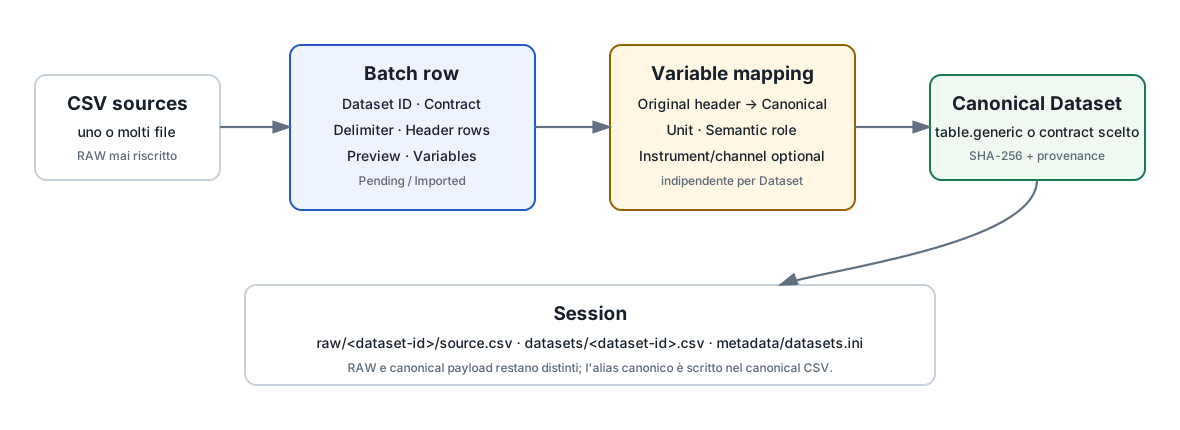
2. Import singolo e batch
La modalità storica a file singolo rimane supportata. Per importare più Dataset nella stessa Session usa la tabella batch.
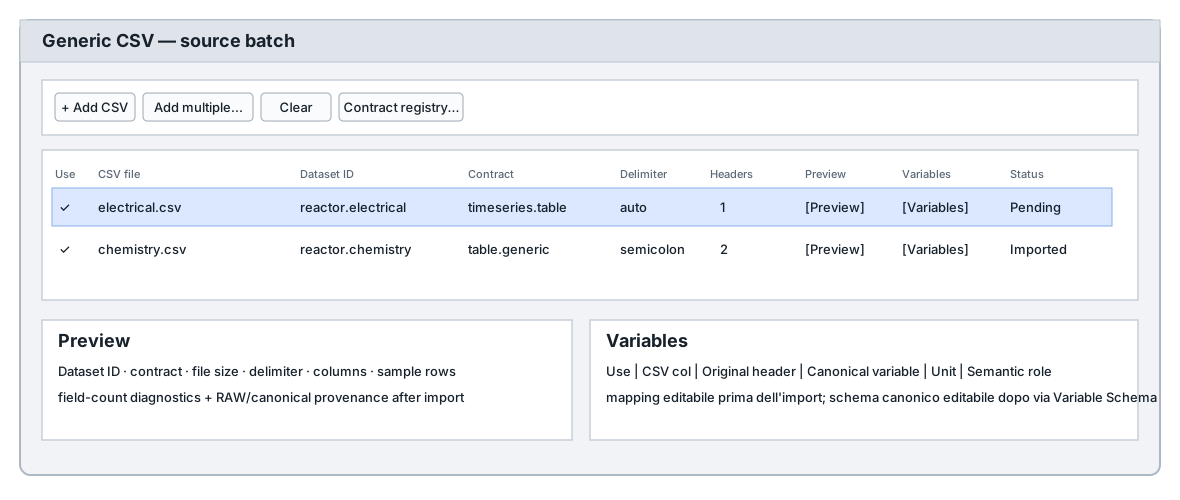
2.1 Campi principali
| Campo | Funzione |
|---|---|
| Dataset ID | Identità canonica stabile del Dataset. |
| Contract | Contratto scientifico, scelto dal Contract Registry oppure inserito come custom. |
| Delimiter | auto, comma, semicolon o tab. |
| Header rows | Numero di righe di intestazione. |
| Preview | Ispeziona struttura e righe campione senza dover aprire manualmente il CSV. |
| Variables | Configura mapping Original header → Canonical variable e relativi metadata. |
3. Dataset ID e contract
Il Dataset ID deve essere unico nella Session. I contract conosciuti vengono proposti dal Contract Registry; la documentazione storica cita fra i contract generici table.generic, timeseries.table, curve_family.table e raw.csv.
Se il contract corretto appartiene a un plugin o a un dominio specifico, usa quello esatto. Un custom contract viene conservato letteralmente anche se il provider originale non è più presente.
4. Preview prima dell’import
La Preview mostra almeno stato, Dataset ID, contract, file, dimensione, delimiter, header rows, numero colonne, righe campionate, mapping corrente e diagnostica semplice sulla consistenza del numero di campi.
Per un Dataset già importato mostra anche provenance disponibile, incluso RAW e checksum canonico quando registrati.
5. Variables mapping
Il workspace Variables mette fianco a fianco:
Use | CSV col | Original header | Canonical variable | Unit | Semantic role | Instrument | Instrument channelEsempio:
Vg1_V    → Vg
Ib_mA    → Ia
Ig1_mA   → Ig
Il canonical CSV prodotto conterrà Vg,Ia,Ig; il RAW conserva invece le intestazioni originali.
6. Unit e Semantic role
Unità e ruolo semantico possono essere impostati per variabile. Dopo l'import, lo schema canonico può essere aggiornato attraverso Dataset Variable Schema senza modificare il RAW.
La semantic role è un hint scientifico; non sostituisce il Variable ID e non effettua automaticamente matching o conversioni fra Dataset diversi.
7. Dataset Metadata
I metadata generici del Dataset sono separati dal Variable Schema. Dopo l'import puoi usare Variables → Metadata... per aggiungere o modificare campi come descrizione, condizioni sperimentali, strumenti o provenance di dominio.
Questo non riscrive il canonical CSV né il RAW.
8. Import incrementale nella Session corrente
Dopo che la Session esiste puoi aggiungere nuove righe alla batch table. Il comando Import enabled pending into current session importa soltanto righe che sono contemporaneamente:
Use = enabled
AND
Status = Pending
Una riga il cui Dataset ID è già registrato appare come Imported e non viene reinserita silenziosamente.
9. Struttura risultante
session/
├── raw/
│   └── <dataset-id>/
│       └── source.csv
├── datasets/
│   └── <dataset-id>.csv
└── metadata/
    ├── datasets.ini
    └── manifest.ini
La struttura fisica è implementation/storage state. Per consumare i dati usa Dataset ID, Variable ID e le API pubbliche.
10. Usare più Dataset in Analysis
Analysis Source Map assegna i Dataset a ruoli espliciti:
primary      → reactor.electrical
uncertainty  → uncertainty_profile
I bindings possono poi riferirsi a variabili qualificate, senza eseguire implicitamente join o resampling.
11. Errori comuni
- Usare il filename come identità scientifica senza rivedere il Dataset ID proposto.
- Scegliere un contract generico quando ne esiste uno specifico per il consumer.
- Saltare Preview/Variables e scoprire solo dopo che gli header non sono quelli attesi.
- Confondere Original header con Canonical variable.
- Aspettarsi che il batch allinei automaticamente file con lunghezze o assi diversi.
12. Guide collegate
Riferimento tecnico completo
Questa parte raccoglie integralmente la documentazione tecnica pertinente distribuita con GX-TXT per gli argomenti e i moduli trattati in questa pagina.
Generic CSV multi-import — GX-TXT Pipeline v0.8.6
Generic CSV multi-import — GX-TXT Pipeline v0.8.6
acq.generic_csv supports both the historical single-file
path and a new multi-CSV batch table.
Single-file mode
The existing fields remain available and backward compatible:
Acquisition CSV
Canonical dataset ID
Dataset contract / kind
CSV delimiter
Header rows
The Channels/Variables page can still be used by the established single-file path to rename/map source columns.
Multi-CSV batch mode
In the Acquisition tab choose:
Import module = acq.generic_csvThe Multi-CSV canonical dataset import table appears
below the ordinary configuration.
Controls:
Use batch table
+ Add CSV
Add multiple...
Clear
Contract registry...
Each enabled row contains:
Use
CSV file
Dataset ID
Contract
Other / custom contract
Delimiter
Header rows
Preview
Variables
Preview shows the selected file structure and sample
rows before import. Variables opens the per-dataset
variable map, where Original header and Canonical variable are displayed
side by side.
The table has vertical and horizontal scrolling and is intended for an arbitrary practical number of input CSV files.
Add multiple files
Add multiple... allows selecting several files in one
file-picker operation. GX-TXT creates one editable row per file and
proposes a dataset ID from the filename.
Always review the proposed IDs before running the import.
Contract selection
Known contract IDs are supplied by the Contract Registry and therefore come from the framework plus installed plugin descriptors.
Current framework contracts include:
curve_family.table
raw.csv
table.generic
timeseries.table
If the correct contract is not listed, choose:
Other...and type the exact contract in the adjacent field.
The custom value is stored literally in the session manifest and dataset registry.
Batch canonicalization
By default, batch mode uses the final configured header row as an identity mapping. Before import, each row may define an independent variable map. Canonical aliases are written into the canonical CSV header while RAW sources are preserved unchanged for provenance.
Example:
Original header -> Canonical variable
Vg1_V           -> Vg
Ib_mA           -> Ia
Ig1_mA           -> Ig
The resulting layout is conceptually:
session/
  raw/
    <dataset-id>/source.csv
  datasets/
    <dataset-id>.csv
  metadata/
    datasets.ini
    manifest.ini
Each dataset receives independent:
- ID;
- contract;
- source SHA-256;
- canonical SHA-256;
- canonical path;
- column list.
Example
electrical.csv  -> reactor.electrical -> timeseries.table
chemistry.csv   -> reactor.chemistry  -> table.generic
ftir_01.csv     -> ftir.sample01      -> Other... / spectrum.table
These datasets can then be consumed independently or jointly by analysis plugins and Scientific Analysis Definitions.
Manifest persistence
Batch configuration is stored under:
[generic_csv_batch]
api_version=1
enabled=1
count=...

[generic_csv_batch.1]
...
Custom/unknown contract values are preserved even if their original provider plugin is no longer available.
See also DATASET_INSPECTION_VARIABLE_MAPPING_API_v1.md
for the normative mapping/provenance contract.
v0.8.7 — adding datasets after the session exists
The primary Import/Run action still creates the session and imports all enabled batch rows.
Once currentSession exists, the batch bar provides
Import enabled pending into current session.
Eligibility is strictly:
Use = enabled
AND
Status = Pending
The incremental command never calls makeSession, never
clears datasets.ini, and never imports disabled rows. Rows
already registered by Dataset ID are shown as Imported and
are not imported again.
acq.generic_csv
acq.generic_csv
Standard Module API v1 acquisition/import plugin for one or many generic CSV tables. It creates canonical datasets, assigns dataset IDs/contracts, snapshots RAW sources, and records SHA-256 provenance.
See also docs/guides/GENERIC_CSV_MULTI_IMPORT.md,
docs/guides/MULTI_DATASET_IMPORT_AND_INSPECTION.md,
docs/api/DATASET_API_v1.md,
docs/api/DATASET_INSPECTION_VARIABLE_MAPPING_API_v1.md, and
docs/api/CONTRACT_REGISTRY_API_v1.md.
Acquisition / Import
Acquisition / Import
Select an importer, add one or more files or a folder, inspect the pending queue, then import into the current Session. Successful items leave the queue; failed items retain their status for correction. The queue is an interactive work list and is not stored in the Session manifest.
Importer Builder creates reusable registered import definitions for tabular sources. Configure parsing, file matching, metadata and variable mapping against a representative file, test the definition, then select it in Acquisition. The definition is stored in the user configuration area, while every published Dataset records its importer identity and version.
Acquisition Handler plugins may also supply scientific or binary import paths. Their manuals describe expected file formats and interpretation options. GX-TXT preserves each source and records hashes and publication provenance.