Indice
Versione verificata
| Framework | GX-TXT 0.9.8.10-dev-031 |
|---|---|
| Modulo | acq.rigol_csv 2.0.0 |
| Output | timeseries.table |
| Runtime import | GNU Octave configurato |
1. Workflow
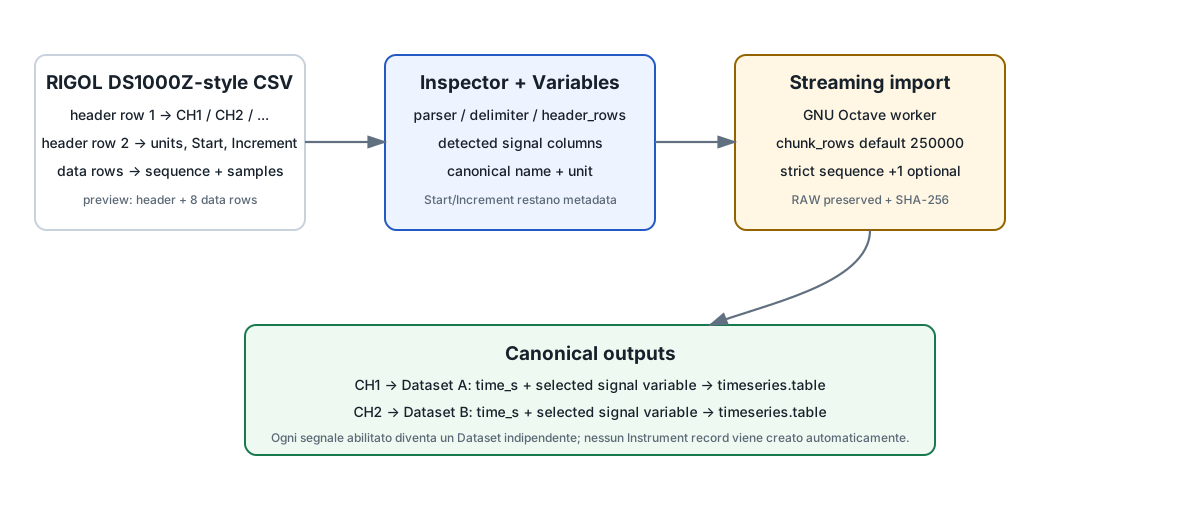
- Seleziona Rigol oscilloscope CSV import in Acquisition.
- Aggiungi il file alla source batch table.
- Controlla parser/layout nella configurazione.
- Apri Preview e Variables.
- Assegna canonical names e unità ai segnali da importare.
- Avvia l'import.
2. Parser disponibili
rigol_ds1000z | Layout RIGOL DS1000Z-style; default. |
|---|---|
generic_sequence | Sequenza con sequence column configurabile. |
generic_time | Layout basato su colonna tempo esplicita. |
3. Configurazione principale
| Campo | Default dev-031 | Scopo |
|---|---|---|
| Delimiter | comma | comma / semicolon / tab. |
| Header rows | 2 | Righe iniziali da interpretare come header. |
| Sequence column | 1 | Indice della sequenza per parser sequence. |
| Time column | 1 | Indice della colonna tempo per parser generic_time. |
| Manual tStart / dt | blank | Override manuale del timing quando necessario. |
| Chunk rows | 250000 | Blocchi di parsing del worker. |
| Raw fields | 0 = auto | Numero campi record quando il layout lo richiede. |
| Trailing fields | 0 | Campi finali da ignorare. |
| Strict sequence | ON | Controllo incremento +1. |
4. Preview RIGOL
La Preview è intenzionalmente leggera: legge l'header configurato e un piccolo campione — il manuale corrente indica otto righe dati — senza scansione completa del file.
Nel layout DS1000Z nativo:
- la prima header row fornisce i nomi dei canali;
- la seconda fornisce unità e timing;
StarteIncrementvengono mantenuti come metadata, non come colonne di segnale.
5. Variables
La tabella Variables contiene soltanto i segnali individuati dal parser. Qui scegli quali colonne abilitare e assegni canonical name e unità.
CSV column 2 → source channel CH1 → canonical variable Va_V
CSV column 3 → source channel CH2 → canonical variable Vg_V
6. Output Dataset
Ogni segnale abilitato diventa un Dataset canonico timeseries.table con:
time_s
<selected signal variable>
Il RAW originale viene preservato e CORE registra Dataset, hashes e provenance.
7. Timing
Nel formato RIGOL nativo, timing e unità vengono estratti dall'header. Se il file reale ha una struttura diversa, parser, header count, sequence/time columns oppure tStart/dt devono essere adeguati prima dell'import.
La stessa configurazione viene usata da Preview e import; non esistono due parser con impostazioni divergenti.
8. Large CSV
Il worker streaming evita di caricare l'intera acquisizione in memoria. chunk_rows definisce il blocco di lavoro del parser e può essere regolato se necessario.
La Preview rimane comunque bounded e separata dalla scansione completa richiesta dall'import.
9. Instrument provenance
L'importatore non crea automaticamente un oscilloscopio nella sezione Instrumentation. Se vuoi registrare modello, seriale, firmware o canale fisico, crea esplicitamente l'Instrument instance e collega le variabili ai suoi ID/canali.
10. Diagnostica
Un file non riconosciuto o con layout incoerente deve restare un failure esplicito. Non va “riparato” cambiando arbitrariamente il formato sorgente. Controlla:
- numero di header rows;
- delimiter;
- parser selezionato;
- sequence/time column;
- numero di campi e trailing fields;
- sequence increment quando Strict sequence è attivo.
11. Guide collegate
- Generic CSV — per tabelle non vendor-specific.
- Dataset e Variable ID.
- Scientific Dataset Plot.
Riferimento tecnico completo
Questa parte raccoglie integralmente la documentazione tecnica pertinente distribuita con GX-TXT per gli argomenti e i moduli trattati in questa pagina.
Native Rigol CSV Import — `acq.rigol_csv`
Native Rigol CSV Import —
acq.rigol_csv
GPL-3.0-or-later
acq.rigol_csv is a native Standard Module API v1
acquisition module in v0.6.1. It is no longer registered as
legacy_adapter.
The module descriptor owns parser/layout configuration. The existing
gxtxt_csv_worker.m is retained as the scientific/streaming
engine because it is already proven on large oscilloscope CSV files;
reusing an implementation does not make the module legacy as long as the
public configuration and outputs obey the standard module contract.
Configuration
Descriptor fields include parser, delimiter, header rows,
sequence/time columns, manual tStart/dt, chunk
size, record shape and strict sequence checking.
Variables
Channel/quantity assignment is no longer a predefined
ProvaTelecomando mapping. The Variables tab defines enabled source
columns and canonical names. For Rigol, Source channel may
contain values such as CH1, CH2, etc.
Example:
CSV column 2 -> source channel CH1 -> canonical variable Va_V
CSV column 3 -> source channel CH2 -> canonical variable Vg_V
After a successful worker run, available channel outputs are
registered in metadata/datasets.ini with
source_module=acq.rigol_csv.
Instruments
The Rigol importer does not automatically create an oscilloscope record. If instrument provenance is wanted, add the actual oscilloscope in Instrumentation and associate variables with its stable ID/channel.
Rigol CSV Import
Rigol CSV Import
Select Rigol oscilloscope CSV import in Acquisition,
then add the source CSV to the standard batch table. The module previews
the configured header and eight data rows before import. The Variables
table shows detected signal columns; choose canonical names and units
there. A Rigol DS1000Z source uses the first header row for channel
names and the second for units, Start, and
Increment. Start and Increment
are timing metadata, not signals.
The default parser expects two header rows, a sequence number in column 1, and comma-separated records. Change parser, delimiter, header count, column mapping, or raw/trailing field counts in module configuration when the actual export layout requires it. Those settings apply to both Preview and import. An invalid or unsupported source remains a GX-TXT import failure to diagnose; the module does not label previously supported Rigol exports as bad external data merely because a preview could not map them.
Import preserves the RAW source and runs the existing streaming
Octave worker. Each enabled signal becomes a canonical
timeseries.table Dataset with time_s and the
selected signal variable. CORE owns the Dataset registry, transaction,
provenance, and source hashes. Import does not create an Instrument
record automatically. Add the actual oscilloscope in Instrumentation
when instrument provenance is needed.
Requires GX-TXT 0.9.8.10-dev and the configured GNU Octave runtime. The package uses Acquisition Handler Plugin API v1, Configuration API v1, and Plugin Install API v1. No Acquisition CORE redesign is required.
acq.rigol_csv
acq.rigol_csv
Standard Module API v1 acquisition/import plugin for supported Rigol oscilloscope and sequence CSV exports. It preserves the RAW source and produces canonical time-series datasets through the streaming Octave worker.
Version 2.0.0
The acquisition module now uses its Acquisition Handler Plugin API v1
runtime instead of the legacy rigol_csv handler ID. This
makes pending-file preview and variable discovery use the module’s own
inspector.
The inspector is intentionally lightweight and reads only the configured header plus a small sample. Large oscilloscope CSV exports are therefore previewed without loading or scanning the complete acquisition.
For native Rigol DS1000Z-style exports, channel names are taken from
the first header row, units and timing values from the second row, and
Start / Increment remain metadata rather than
signal columns. The preview returns detected channels, timing metadata,
field structure and sample rows.
See also docs/guides/RIGOL_NATIVE_IMPORT.md,
docs/api/DATASET_API_v1.md, and
docs/api/MODULE_API_v1.md in the GX-TXT framework
sources.
Install acq.rigol_csv_2.0.0.zip through Plugin Install
API v1. See MANUAL.md for the current workflow and
CHANGELOG.md for the change scope.