Indice
Versione verificata
| Framework | GX-TXT 0.9.8.10-dev-031 |
|---|---|
| UI/API principale | SESSION_FILE_EXPLORER_API_v1 + Session Script Explorer |
| Limite preview file | 4 MiB nella dev-031 |
1. Session files non è un file manager generale
La scheda Session files attraversa soltanto la Session corrente e mostra file text-like supportati. Non permette di navigare liberamente il filesystem.
Le estensioni accettate nella dev-031 sono:
.txt .csv .tsv .md .ini .log .json .yaml .yml .cfg .dat .asc .cir .net .libI plot sono esclusi perché hanno un workflow di visualizzazione dedicato.
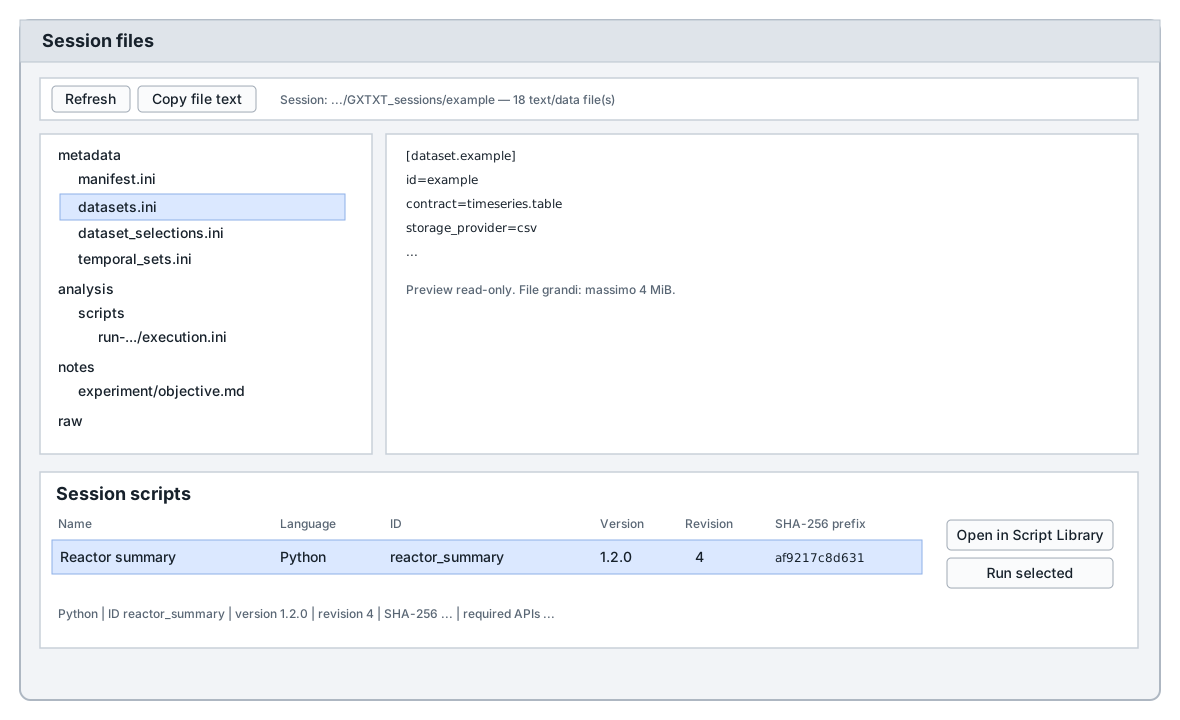
session_file_explorer_api_v1.tcl: file tree e preview in alto, Session scripts in basso.2. Barra superiore
- Refresh — riscan della Session corrente.
- Copy file text — copia il testo della preview.
- Info — mostra Session path e conteggio dei file text/data rilevati.
3. Tree dei file
Il pannello sinistro ricostruisce le directory relative alla Session. Ogni file è risolto contro la root corrente; un path fuori Session viene rifiutato.
Selezionare o fare doppio click su un file apre la preview read-only nel pannello destro. File non supportati non vengono presentati come testo.
4. Preview e limite di sicurezza
Il reader usa UTF-8 e limita la preview. Nella dev-031 sessionFileMaxBytes è 4.194.304 byte. Se il file è più grande, vengono letti soltanto i primi 4 MiB e viene aggiunto un messaggio di troncamento.
5. Session Script Explorer
Nella stessa pagina, sotto il file explorer, la dev-031 elenca gli script registrati con scope Session. Le colonne sono:
| Name | Language | ID | Version | Revision | SHA-256 prefix |
|---|---|---|---|---|---|
| nome leggibile | Python / Octave | ID stabile | semver | revisione | prime 12 cifre del digest |
Selezionando uno script, la riga informativa mostra anche SHA-256 completo, required APIs e descrizione.
I pulsanti disponibili sono Open in Script Library e Run selected. Il doppio click apre lo script nella Script Library.
6. Identità dello script di Session
Lo script registrato ha riferimento qualificato session:<id>. È uno snapshot fisico separato da un eventuale script user:<id>. Una modifica successiva alla User Library non riscrive silenziosamente la copia assegnata alla Session.
Ogni esecuzione conserva snapshot, log, report ed execution.ini sotto analysis/scripts/<run_id>/.
7. File visibile ≠ risorsa logica
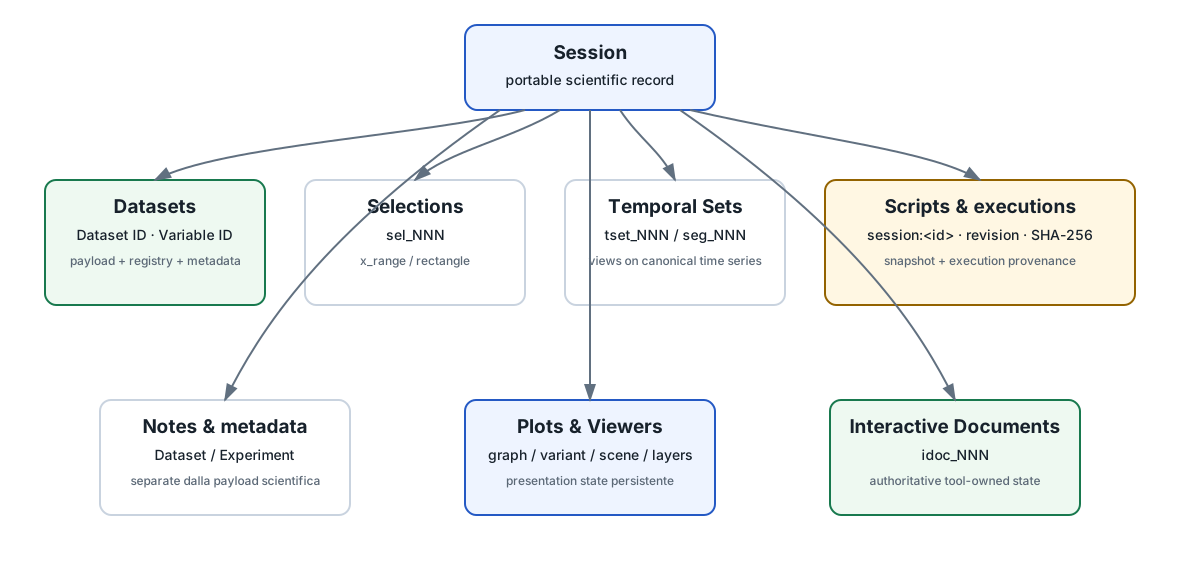
Molte risorse persistenti sono implementate tramite file INI, JSON o sidecar, ma il file non è il loro contratto pubblico. La risorsa è identificata da un ID e deve essere usata attraverso l'API semantica che la possiede.
8. Dataset
I Dataset sono indicizzati da metadata/datasets.ini, ma consumer e script devono usare Dataset API. Il Dataset ID e i Variable ID restano le identità stabili.
Dataset Metadata può vivere in sidecar sotto metadata/datasets/; Dataset Notes può vivere sotto notes/datasets/. Sono risorse distinte.
9. Dataset Selections
Le Selection persistenti usano ID come sel_001 e tipi x_range o rectangle. Sono normalmente registrate in metadata/dataset_selections.ini.
Una Selection non copia né filtra fisicamente il Dataset. Descrive un intervallo riusabile attraverso identità Dataset/Variable stabili e coordinate.
10. Temporal Sets
Le Temporal Set persistono definizioni come tset_001. Possono essere segment_set o window_set e vivono come viste temporali sopra un Dataset canonico.
Il registry corrente è metadata/temporal_sets.ini. Le finestre generate non vengono necessariamente persistite una per una: la definizione autorevole viene risolta quando serve.
11. Interactive Documents
Interactive Document API memorizza stato UTF-8 autorevole appartenente a strumenti interattivi che non può essere ridotto a metadata, viewer state o cache. Gli ID sono del tipo idoc_0001.
Il documento appartiene alla Session e a un owner module/provider. Runtime o cache possono essere ricostruiti senza cancellare il documento autorevole.
12. Plot, Variant, viewer scene e layers
Plot e Viewer conservano presentation state persistente. Un Plot Variant non è soltanto un PNG: possiede identità e configurazione persistente. Analogamente scene e layers dei viewer devono passare dalle relative API pubbliche.
I file derivati visibili nella Session possono essere utili per ispezione, ma non sono automaticamente il luogo corretto da modificare.
13. Manifest e Session Persistence
metadata/manifest.ini conserva lo stato framework-owned principale della Session: moduli, configurazioni, bindings, graph state e altri elementi registrati. Session Persistence API v1 può commitare semanticamente lo stato della Session corrente.
La regola è: prima usare l'API proprietaria della risorsa — Dataset Publication, Plot Dataset, Viewer Provider, Selection, Interactive Document — e usare Session Persistence quando serve salvare lo stato complessivo corrente.
14. Session Inspection API
Per exporter e strumenti di presentazione esiste una superficie read-only che espone summary, Dataset IDs, Dataset details, Selections e file inventory senza costringere il consumer a leggere layout privati del registry.
Può anche risolvere risorse Session-relative, verificare SHA-256 e produrre uno snapshot di ispezione.
15. Portabilità della Session
Export Session... crea un package portabile lossless con manifest di trasporto, inventario file, dimensioni e SHA-256. Import valida l'archivio, usa staging e commette solo dopo verifica completa.
Gli ID scientifici della Session non vengono rigenerati soltanto perché la Session viene esportata/importata.
16. Cosa puoi modificare direttamente dal file explorer?
La preview è intenzionalmente read-only. Alcuni file di note possono aprire strumenti di editing dedicati attraverso altre parti di GX-TXT, ma Session files non è il posto dove alterare registri e manifest.
datasets.ini o temporal_sets.ini non significa che sia corretto modificarli a mano durante una Session attiva. Usa sempre l'API o l'editor che possiede quella risorsa.17. Mappa rapida delle risorse
| Risorsa | ID tipico | API/owner | È una copia del Dataset? |
|---|---|---|---|
| Dataset | reactor.run17 | Canonical Dataset / Publication | È il Dataset |
| Selection | sel_001 | Dataset Selection API | No |
| Temporal Set | tset_001 | Temporal Set API | No |
| Session script | session:fit_model | Script Registry/Execution | No |
| Interactive Document | idoc_0001 | Interactive Document API | No |
| Plot Variant | graph + variant_id | Plot/Graph APIs | No |
- Introduzione a GX-TXT.
- Dataset e Variable ID.
- Octave & Python Script Workspaces.
- Guida alle API reference utilizzabili con Script Bridge.
- Projects, Experiments e Sessions — relazione fra la Session corrente, l'Experiment e il Project.
Riferimento tecnico completo
Questa parte raccoglie integralmente la documentazione tecnica pertinente distribuita con GX-TXT per gli argomenti e i moduli trattati in questa pagina.
GX-TXT Session File Explorer API v1
GX-TXT Session File Explorer API v1
Introduced: GX-TXT Pipeline v0.9.0
Purpose: read-only inspection of text/data files
belonging to the current GX-TXT session.
The Session files workspace is intentionally not a general file manager.
It only traverses currentSession and exposes text-like
files such as:
.txt .csv .tsv .md .ini .log .json .yaml .yml .cfg .asc .cir .net .libPlots are intentionally excluded because GX-TXT already has the Plot display workflow.
Public helpers
::GX::sessionFileExplorerAllowed $path
::GX::sessionFileExplorerScan
::GX::sessionFileExplorerRead $path
::GX::sessionFileExplorerPopulate
Every path is resolved against the current session. The reader never allows browsing outside that session.
The GUI places Session files immediately before Help. Selecting a file in the left tree displays its text read-only on the right. Large text files are truncated to a safe preview limit rather than loaded without bound.
GX-TXT Session Inspection API v1
GX-TXT Session Inspection API v1
License: GPL-3.0-or-later
Purpose
Session Inspection API v1 is a read-only public surface for exporters, archival tools and presentation modules. It exposes structured Session facts without requiring modules to read private CORE registry arrays or registry file layouts.
Public entry points:
::GX::sessionInspectionSummary ?session?
::GX::sessionInspectionDatasetIds ?session?
::GX::sessionInspectionDataset datasetId ?session?
::GX::sessionInspectionDatasetPayload datasetId ?session?
::GX::sessionInspectionCurrentSession
::GX::sessionInspectionResolveResource relativePath ?session? ?expectedSha256?
::GX::sessionInspectionSelectionIds ?session?
::GX::sessionInspectionSelection selectionId ?session?
::GX::sessionInspectionFileInventory ?session?
::GX::sessionInspectionWriteSnapshot path ?session?
The optional Session argument defaults to the open Session.
sessionInspectionCurrentSession returns the validated
current Session path for a module that must create Session-owned
resources. It does not expose private CORE state.
sessionInspectionResolveResource resolves a relative
Session file, rejects escape and symlink paths, computes SHA-256 and can
require an expected digest. It returns path, relative path, size and
digest.
sessionInspectionSelectionIds and
sessionInspectionSelection query persistent Dataset
Selection records directly from the named Session without loading or
replacing global Selection registry state. Stable Dataset and variable
IDs remain the Selection authority. For current-Session editable
selection operations, use Dataset Selection API v1.
sessionInspectionDatasetPayload returns
dataset_id, absolute path, Session-relative
relative_path, canonical sha256,
format, and contract. It rejects missing
payloads, paths outside the Session, symlinks, and content whose digest
differs from the canonical Dataset registry. Viewer modules should use
this public call to select imported geometry and scientific data.
Snapshot
sessionInspectionWriteSnapshot writes UTF-8
GXTXT_SESSION_INSPECTION_V1. Records contain a category,
object identity, field and value; variable fields are Base64 encoded so
arbitrary UTF-8 and line breaks remain unambiguous.
The snapshot includes the Session summary, manifest fields, Dataset registry fields, Dataset Metadata through the public metadata API, Dataset notes through the public notes API, and an SHA-256 file inventory. It is a read-only export snapshot, not authoritative Session storage.
Security and scope
File inventory is Session-root scoped and does not expose arbitrary external filesystem trees. Consumers must continue to treat labels, filenames, notes and file content as untrusted data and escape/sanitize them for their target format.
GX-TXT Session Action Provider API v1
GX-TXT Session Action Provider API v1
License: GPL-3.0-or-later
Purpose
Session Action Provider API v1 lets an installed module advertise a small Session-level command without hard-coding the module inside GX-TXT CORE. The provider is descriptor-driven and lazily activates the module’s declared public API only when the action is invoked.
Example descriptor:
[session_actions]
api_version=1
ids=export_html

[session_action.export_html]
name=Export Session to HTML...
public_api=SESSION_HTML_EXPORT_API_v1
command=::SessionHtmlExport::guiExport
requires_session=1
order=500
public_api must also be declared by the module under
[public_apis]. Discovery does not source the module
entrypoint and therefore remains host-independent. Invocation uses the
existing Standard Module public-API loader and is idempotent.
Public entry points:
::GX::sessionActionProviderList
::GX::sessionActionInvoke moduleId actionId
The standard GUI presents discovered actions under
Session Tools.
Session Persistence API v1
Session Persistence API v1
::GX::sessionPersistenceCommit commits the
current open Session’s framework-owned Manifest Format
2 state. It takes no key/value input and cannot write another Session.
CORE serializes current module, graph, Viewer and other registered
state, validates the new Manifest, and atomically replaces
metadata/manifest.ini. It returns the Session path,
Manifest path and SHA-256.
Use the owning semantic API first: Dataset Publication for Dataset
output, Plot Dataset API v3 for plots, Viewer Provider for scenes,
Configuration for supported settings, Dataset Selection for selections,
and Interactive Document for provider documents. Call
sessionPersistenceCommit when a headless workflow needs to
save the complete current Session state without using the GUI Save
action. Individual provider APIs may also commit after a completed
operation. This API does not expose arbitrary Manifest mutation,
registry arrays, or provider storage paths.
::GX::PlotDatasetAPIv3::applySpec $plotRef $spec
set committed [::GX::sessionPersistenceCommit]
The caller must have opened a Session through the framework. Dataset Publication and other transactional services continue to own their own sidecar/registry commits and rollback boundaries.
GX-TXT Interactive Document API v1
GX-TXT Interactive Document API v1
SPDX-License-Identifier: GPL-3.0-or-later
Introduced: GX-TXT 0.9.7.78
Interactive Document API v1 stores authoritative, module-owned UTF-8 scientific state scoped to the currently open GX-TXT Session. It is intended for interactive tools whose user-created document is not adequately represented by Dataset metadata, Viewer presentation state, runtime cache or a render cache.
Examples include calibrated curve digitizations, durable scientific annotations and other interactive documents where closing the UI must not discard the scientific work.
Authority model
Keep this distinction explicit:
authoritative Interactive Document
        ↓
derived viewer/UI/runtime/cache
Deleting or rebuilding runtime/cache must not delete the Interactive Document. Viewer scene/layer state remains a separate presentation mechanism.
Scope and ownership
Every document belongs to:
- the current Session;
- a stable document ID such as
idoc_0001; module_id;provider_id;- an application-defined
format; - an application-defined
format_version.
A Session must be open for every operation. Documents in another Session are not visible through the current Session’s API calls.
The public API does not expose internal filesystem paths. CORE may use internal Session files to implement persistence, but modules must treat the returned metadata and payload as the complete public contract.
Public Tcl API
Create
::GX::interactiveDocumentCreate module_id provider_id format format_version payload ?document_id?Creates one UTF-8 document. When document_id is omitted,
CORE allocates the next stable Session-local identity. Supplying an
existing ID is an error.
Returns public metadata containing:
id
module_id
provider_id
format
format_version
sha256
created_at
updated_at
Exists
::GX::interactiveDocumentExists document_idReturns 1 if the document exists in the current Session,
otherwise 0.
List
::GX::interactiveDocumentList
::GX::interactiveDocumentList module_id provider_id
Lists public metadata. Filtering requires both owner fields. Internal storage identities are never returned.
Read
::GX::interactiveDocumentRead document_idReturns public metadata plus payload. CORE verifies the
stored SHA-256 before returning the payload. A missing or modified
payload produces an explicit error; it is never converted into an empty
valid-looking document.
Update
::GX::interactiveDocumentUpdate document_id payload ?format? ?format_version?Updates the authoritative payload while preserving document identity and creation metadata. Optional non-empty format/version arguments replace the corresponding metadata. CORE updates the payload SHA-256 and timestamp.
Delete
::GX::interactiveDocumentDelete document_idExplicitly removes the document and its CORE-managed payload from the current Session. Runtime reset does not call this operation.
Opaque live-Session token
::GX::interactiveDocumentSessionTokenReturns an opaque token for the currently open Session. It exists for adapters that keep an external UI process alive and need to reject writes after the GX process switches Sessions. The token is not scientific state and must not be persisted as a document identity. It intentionally does not reveal the Session path.
UTF-8 and integrity
Payloads are UTF-8 structured text chosen by the owning module (for
example JSON). CORE stores and verifies a SHA-256 digest. The payload
schema itself is owned and versioned by the module through
format and format_version.
CORE validates registry structure and reports explicit diagnostics for:
- invalid document/owner identities;
- unsupported registry version;
- missing registry fields;
- missing payload;
- invalid or mismatching SHA-256;
- unreadable/corrupt state.
An old Session with no Interactive Document registry is valid and simply has an empty document list.
Session persistence and isolation
Documents live with the Session and therefore survive normal Save/close/reopen and GX-TXT restart. They do not depend on a running Viewer backend. Two Sessions with identically named providers have independent document registries and payloads.
Modules should store references and provenance rather than duplicating large source data. For example an interactive image tool can store Dataset/artifact identity and SHA-256 while leaving the original source under its established GX-TXT ownership.
Runtime and Module Reset
Interactive Documents are authoritative user state. Module Reset or
other runtime/cache cleanup may close/rebuild derived adapters and
render state but must not remove these documents. Deletion is explicit
through interactiveDocumentDelete.
Viewer integration pattern
A Viewer Provider can combine both public APIs:
Viewers discovery
→ no desktop activation
→ Open/Rerender
→ Viewer Provider activation_api
→ module public API activation
→ backend registration
→ Interactive Document read/create/update
→ backend-owned UI
The UI may use temporary bridge files or process IPC as runtime implementation details, but authoritative scientific state must be committed through this API.
Compatibility
Interactive Document API v1 is additive. Existing Sessions require no migration. Existing Viewer scenes, Dataset resources and module runtime caches keep their previous semantics.
GX-TXT Temporal Set API v1
GX-TXT Temporal Set API v1
Introduced: GX-TXT Pipeline v0.9.7.58
License: GPL-3.0-or-later
Purpose and terminology
Temporal Set API v1 is the public, persistent, runtime-independent CORE facility for reusable temporal portions of canonical time-series Datasets. It deliberately avoids the word chunk, which already has Table Stream and storage meanings.
The API has two resource types:
- Temporal Segment Set (
segment_set): an ordered collection of arbitrary, possibly non-contiguous user-authored intervals with stable segment IDs and optional labels. - Temporal Window Set (
window_set): a compact regular generator definition using sample counts or durations. Generated members are derived state and are not persisted one-by-one.
Both are views over source data. Creating or resolving a Temporal Set does not create a Dataset, copy/concatenate samples, write per-window files, or modify source values.
Resource identity and persistence
Temporal Sets use stable IDs such as tset_001. Segment
members use stable IDs such as seg_001. Definitions are
stored in the session resource registry:
metadata/temporal_sets.iniThis file is CORE-owned persistent state. Analysis modules do not
open it. Regular member IDs such as win_000001 are
deterministic derived identities reconstructed from the generator and
current authoritative source state.
The persistence invariant is:
authoritative Temporal Set definition
        ↓
validation + range resolution
        ↓
derived runtime representation
Deleting or rebuilding runtime never deletes Temporal Set
definitions. temporalSetDelete is the explicit operation
that deletes a Temporal Set resource.
Common associations
Every Temporal Set identifies:
source_dataset_id
 temporal_variable_id
The temporal variable is a stable Dataset Variable Schema v3 variable ID. It must be one-dimensional, numeric/elapsed-time capable, and have a temporal unit compatible with seconds.
A Temporal Set may also specify:
parent_selection_idThe parent must be an existing Dataset Selection API v1
x_range over the same Dataset and temporal variable in
canonical source coordinates. The Selection restricts the effective row
interval; it does not become a copied subset.
Boundary contract
Temporal Set intervals use:
start_inclusive_end_exclusiveThat is, [start,end). Source ranges use zero-based
row_start plus row_count, matching Canonical
Dataset API v2 bounded range reads.
Dataset Selection API v1 itself is unchanged. Its existing
x_range upper bound remains inclusive when CORE maps the
Selection into the effective parent row range. Temporal members are then
generated/resolved within that row range.
Arbitrary Temporal Segment Sets
Create:
set setId [::GX::temporalSetCreate [dict create \
    type segment_set \
    source_dataset_id reactor.run \
    temporal_variable_id time \
    label {Experiment phases} \
    segments [list \
        [dict create label {warm-up} start 0 end 20] \
        [dict create label {stable region} start 35 end 80] \
        [dict create label {reaction phase 1} start 120 end 145]]]]
The start/end values use the Temporal Set’s canonical numeric
temporal unit. The returned definition exposes the generated stable
member IDs. When editing or reordering existing segments, pass those IDs
back to temporalSetUpdate to preserve member identity.
Read/update/enumerate/delete:
set definition [::GX::temporalSetRead $setId]
set all [::GX::temporalSetList]
set forDataset [::GX::temporalSetList reactor.run]
::GX::temporalSetUpdate $setId [dict create label {Reviewed phases} segments $segments]
::GX::temporalSetDelete $setId
Separated intervals stay separate. CORE does not concatenate them or create a materialized Dataset.
Regular Temporal Window Sets
Sample-based
set setId [::GX::temporalSetCreate [dict create \
    type window_set \
    source_dataset_id audio.run \
    temporal_variable_id time \
    generator_basis samples \
    window_size 4096 \
    step 2048 \
    partial_policy drop]]
window_size and step are positive integer
row/sample counts. step < window_size overlaps; equality
produces adjacent windows; step > window_size leaves
gaps.
Duration-based
For a canonical uniform temporal axis:
set setId [::GX::temporalSetCreate [dict create \
    type window_set \
    source_dataset_id experiment.run \
    temporal_variable_id time \
    generator_basis duration \
    window_size 10 \
    step 5 \
    duration_unit s \
    partial_policy drop]]
duration_unit may be omitted; it then defaults to the
temporal variable’s current numeric unit. For
value_kind=elapsed_time / value_format=hms,
that numeric unit is the public elapsed-time base unit s,
as defined by Elapsed Time
Contract v1. Conversion uses the existing GX-TXT Unit/Dimension
infrastructure. Elapsed
Time Requested-Unit API v1 is a separate consumer-view API and does
not change Temporal Set persistence or internal window resolution.
A duration window and step must map to exact positive integral sample counts on the uniform axis. The API reports an explicit diagnostic instead of silently rounding a non-integral mapping.
Final-window policy
The conservative default is:
partial_policy=dropA final member that would extend beyond the effective parent interval is omitted.
A caller may explicitly request:
partial_policy=includeIn that case the final member is truncated deterministically to the remaining rows. Partial windows are therefore never created silently.
Resolution and iteration
Resolution validates the current Dataset, temporal variable and parent Selection every time derived state is built.
set info [::GX::temporalSetResolveInfo $setId]
set member [::GX::temporalSetResolveMember $setId 1]
set complete [::GX::temporalSetResolve $setId]
::GX::temporalSetIterate $setId myConsumerCallback
A resolved member provides, where meaningful:
index
member_id
label
requested_time_start
requested_time_end
time_start
time_end
row_start
row_count
row_start is zero-based. Segment IDs are persistent.
Regular-window IDs are deterministic (win_000001,
win_000002, …).
temporalSetResolveInfo is preferable when a consumer
only needs generator/range metadata. temporalSetResolve
intentionally materializes the member list in memory and should not be
used for enormous generated window counts.
temporalSetIterate resolves the definition once and yields
members one at a time.
Large-data behavior
Uniform temporal axes are resolved using Dataset Variable Schema metadata:
axis_origin
axis_step
axis_count
No Dataset payload read is required merely to define or resolve regular windows on such axes.
For an explicit temporal coordinate, arbitrary time boundaries are mapped by bounded Canonical Dataset API v2 range reads of only the temporal variable, in finite chunks. CORE does not load/copy the complete multi-variable Dataset merely to resolve a Temporal Set.
Parent Dataset Selection
Example:
Dataset
  ↓
Dataset Selection x_range: 20 s ... 200 s
  ↓
Temporal Window Set: size 10 s, step 5 s
The effective parent row range is first derived from the Selection. Every generated member is then constrained to that range. Consumers do not need to know whether the parent Selection was created graphically or programmatically.
Stale-reference behavior
A Temporal Set is not allowed to look valid while silently losing inputs.
Resolution reports an explicit error when any authoritative reference is missing or incompatible, including:
- source Dataset;
- temporal variable;
- parent Dataset Selection;
- wrong parent Dataset/variable;
- unsupported axis/unit;
- invalid generator values.
Dataset deletion is prevented while a Temporal Set still references that Dataset. If another resource is removed by a path that CORE cannot prevent, the next Temporal Set resolution fails explicitly and identifies the broken reference.
Descriptor integration
A Standard Module may select a Temporal Set with a normal descriptor field:
[config.windows]
type=temporal_set
label=Windows
required=1
source_role=primary
temporal_types=window_set
temporal_types may contain segment_set,
window_set, or both. The standard selector filters
resources by the Dataset currently assigned to the requested Analysis
Source role.
This GUI binding is optional. The semantic Temporal Set API is usable from headless Tcl and does not require Tk.
standard_octave
runtime transport
Runtime generation validates and resolves the selected resource and adds:
[temporal_set_api]
api_version=1

[temporal_set.windows]
api_version=1
id=tset_006
enabled=1
type=window_set
source_dataset_id=temporal.series
temporal_variable_id=time
temporal_unit=s
parent_selection_id=sel_001
boundary_policy=start_inclusive_end_exclusive
effective_row_start=20
effective_row_count=181
member_count=35
generator_basis=duration
window_size=10
step=5
duration_unit=s
partial_policy=drop
resolved_window_rows=10
resolved_step_rows=5
Regular windows remain compact in runtime; thousands or millions of member sections are not emitted.
Segment Sets additionally contain one section per persistent segment because those members are authoritative user-created definitions:
[temporal_set.segments.member.1]
index=1
member_id=seg_001
label=warm-up
requested_time_start=0
requested_time_end=20
time_start=0
time_end=20
row_start=0
row_count=20
No private Dataset or Temporal Set metadata path is part of the public Octave API.
Public Octave helpers
S = gxtxt_temporal_set_from_runtime(runtime_cfg, 'windows');
M = gxtxt_temporal_set_member(S, 1);
gxtxt_temporal_set_from_runtime reconstructs the public
Temporal Set runtime representation. For a Segment Set,
S.members contains its resolved persistent members. For a
Window Set, S keeps the compact generator and resolved row
parameters.
gxtxt_temporal_set_member resolves one 1-based member.
Returned row_start remains zero-based so it can feed the
framework range-read APIs without an implicit indexing conversion.
Compatibility and non-goals
Temporal Set API v1 is additive. It does not alter:
- Dataset Selection API v1 (
x_range/rectangle); - Canonical Dataset API;
- Analysis Source APIs;
- Table Stream chunk semantics;
- Dataset Metadata runtime transport;
- existing
standard_octavemodules; analysis.fft_spectrum;analysis.spectrogram;plot.dataset;- scientific Dataset values.
Temporal Set API v1 was introduced as shared infrastructure in GX-TXT 0.9.7.58. Consumer adoption and the Variables-workspace editor are additive; the editor is available from GX-TXT 0.9.7.75 and does not change the resource model.
Variables-workspace editor (GX-TXT 0.9.7.75)
GX-TXT 0.9.7.75 exposes Temporal Set API v1 through a Dataset-scoped
stacked editor in Variables → Temporal Sets…. The
Dataset selector remains visible and authoritative. The editor supports
creation, editing and deletion of window_set and
segment_set resources using the same public API and the
same metadata/temporal_sets.ini persistence used by
headless callers.
The GUI deliberately distinguishes semantic meaning from
representation. Eligibility is based on the explicit Variable Schema
temporal semantic contract, not on a column name, a time-looking unit,
or value_kind alone. In particular, an explicitly declared
semantic_role=elapsed_time may use either an ordinary
numeric representation (value_kind=number) or the
elapsed-time-specific representation
(value_kind=elapsed_time). A numeric variable named
time, or one whose unit is s, is not
automatically promoted to elapsed-time semantics.
Duration controls enumerate registered units through Unit Registry
API v1 and validate them through Elapsed Time Requested-Unit API v1.
Display/requested units therefore remain separate from source
representation and from the canonical elapsed-time value. Changing
500 ms to display as 0.5 s does not change the
physical Temporal Set definition and does not rewrite Dataset Variable
Schema.
Parent Selection = All dataset is represented by an
empty parent_selection_id; it never creates a synthetic
Dataset Selection. Existing compatible x_range Selections
are listed by stable Selection ID.
The list panel uses temporalSetResolveInfo for its
resolution summary rather than duplicating window-generation logic. Live
standard-module type=temporal_set selectors are refreshed
after create/update/delete operations.
See Temporal Set Editor for the user workflow, duration-unit behavior and practical examples.
Selector fallback correction (GX-TXT 0.9.7.76)
The generic type=temporal_set standard configuration
widget treats an unset display value and the explicit None
choice as an empty module binding. The fallback is handled with normal
Tcl control flow rather than expression barewords, so modules can open
and change an unbound Temporal Set selector safely. Stable Temporal Set
IDs remain the persisted module value.
GX-TXT Dataset Selection API v1
GX-TXT Dataset Selection API v1
Introduced: GX-TXT Pipeline v0.9.2
License: GPL-3.0-or-later
Purpose
A Dataset Selection is a reusable session resource describing a selected interval for one or more canonical dataset bindings without copying, filtering or modifying dataset data. It is built additively above Plot Region Selection API v1.
Selections are stored in metadata/dataset_selections.ini
and receive stable IDs such as sel_001. Read-only queries
for any named Session are available through
sessionInspectionSelectionIds ?session? and
sessionInspectionSelection selectionId ?session?. These do
not mutate the current Selection registry.
Resource model
[dataset_selection.sel_001]
api_version=1
id=sel_001
type=x_range
source_dataset_id=reactor.current.complete
source_role=primary
x_variable=time_s
x_unit=s
x_min=8280
x_max=16920
producer_module=plot.dataset_xy
producer_graph=plot.dataset.xy
For a rectangle, y_variable, y_unit,
y_min and y_max are also present.
Supported v1 types:
x_rangerectangle
The ID identifies the selection resource. Re-selecting the same producer module/graph updates that resource instead of silently creating a new identity.
Graph-provider descriptor mapping
A graph opts in through the existing Plot Region Selection API fields and may map axes to framework bindings:
[graph.plot.dataset.xy]
supports_region_selection=1
region_selection=x_range
region_source=primary
region_x_binding=x
For rectangles:
region_selection=rectangle
region_source=primary
region_x_binding=x
region_y_binding=y
The framework resolves the binding to the canonical Dataset ID and
canonical variable. A provider may use region_x_variable /
region_y_variable as an explicit fallback where a binding
role is not available.
Coordinate domains
For a selection with one source X binding, persisted x_min/x_max remain in that canonical source unit.
When enabled Graph Series use multiple X bindings, the selection is defined by the one shared displayed X interval. The resource sets x_coordinate_space=display and stores x_display_min, x_display_max, x_display_unit, x_binding_count, and x_bindings. Each x_bindings token is dataset_id:variable_id. The legacy singular source fields and canonical x_min/x_max retain the first displayed series projection for backward compatibility; consumers that support heterogeneous Graph Series use the display interval and complete binding list.
Example:
dataset variable: time_s [s]
plot display:      h
user selection:    2 ... 4 h
selection stored:  7200 ... 14400 s
The plot geometry sidecar may publish:
x_source_variable=time_s
x_source_unit=s
x_display_unit=h
x_display_to_source_scale=3600
x_display_to_source_offset=0
and equivalent Y metadata. The inverse display-to-source conversion is framework-owned.
Consumer descriptor field
A module can request a selection with a standard config field:
[config.selection]
type=selection
label=Data selection
required=0
source_role=primary
selection_types=x_range;rectangle
The GUI lists only resources compatible with the canonical dataset currently selected for the requested source role.
Runtime transport
[dataset_selection_api]
api_version=1

[selection.selection]
api_version=1
id=sel_001
enabled=1
type=x_range
source_dataset_id=reactor.current.complete
source_role=primary
x_variable=time_s
x_unit=s
x_min=7200
x_max=14400
Rectangle selections additionally carry Y metadata.
Octave helpers:
S = gxtxt_selection_from_runtime(runtime_cfg, 'selection');
mask = gxtxt_selection_mask(S, x);
mask = gxtxt_selection_mask(S, x, y);  % rectangle
Coordinates passed to gxtxt_selection_mask use x_min/x_max and x_unit. For a heterogeneous Graph Series selection, consumers that operate on the shared axis use x_display_min/x_display_max and x_display_unit together with x_bindings.
Non-goals of v1
The framework does not:
- create a CSV or derived dataset automatically;
- modify the source Dataset Registry entry;
- filter the original dataset;
- rerun analysis automatically after selection changes;
- provide multiple simultaneous regions, lasso/polygon or 3D selections.
A future generic dataset.subset module may materialize
dataset + selection -> new dataset. FFT, fitting and
statistics modules may consume the same selection directly.
Compatibility
[module_plot_region.<module>.<graph>]
remains valid and is still delivered to the producer plugin. Existing
v0.9.1 plugins require no changes. Dataset Selection API v1 is an
additional reusable-resource layer.
GX-TXT 0.9.7.11 variant producer and variable IDs
New Selection records add optional producer_variant and x_variable_id/y_variable_id. The producer identity is producer_module + producer_graph + producer_variant; missing/empty variant means the legacy base graph. Re-selecting p0001 updates p0001’s resource and cannot overwrite p0002’s. Deleting a plot variant does not implicitly delete its independent Selection resource.
Single-binding selections keep canonical coordinate bounds and persist both stable variable IDs and current names. Consumers should prefer source_dataset_id + variable_id; names remain for older plugins and records. The public gxtxt_selection_from_runtime helper exposes the IDs and producer fields when present and still accepts old name-only sections. x_range needs X; rectangle needs X/Y and still maps Y only to the primary/left axis. No source dataset is copied.
Graph Series resolution since 0.9.7.13
For both base graphs and variants, enabled Graph Series are the authoritative source of selection coordinates. Disabled series are ignored. An X-range uses the shared displayed X interval and records every distinct dataset_id + x_variable_id binding. A single-binding selection retains the canonical source-coordinate representation used by earlier releases. For rectangles, Y is resolved from enabled left-axis series only when they share one dataset_id + y_variable_id; rectangle X and Y still require one canonical dataset. An ambiguous rectangle Y or missing left series raises an explicit error. If no series is active, base graphs use their legacy module bindings and variants use their stable-ID X/Y bindings. The saved resource includes dataset-scoped variable IDs and, for a variant, producer_variant.
Calibrated graphical selection and editing (GX-TXT 0.9.7.19)
The graphical tool maps Tk canvas coordinates through the displayed
PNG rectangle and the measured inner data frame of the
exported PNG. The frame is recorded in the ordinary plot geometry
sidecar as axis.1.pixel_rect plus the original image width
and height. This accounts for PNG resizing and renderer layout margins.
The in-memory GNUplot axes.Position alone is not an
accurate raster coordinate transform. A PNG from an older release
without calibration must be rerendered before making a new graphical
selection.
Choose Select area, then drag anywhere inside the data frame to create an X range or rectangle. A click at its visible border is accepted within half a displayed pixel, accounting only for integer mouse event rounding. To edit the existing selection, drag either X-range boundary or its interior; for rectangles, drag an edge, corner, or interior. Motion changes only the temporary overlay. Release validates and commits the new bounds in the selection’s declared coordinate domain to the same Dataset Selection registry resource.
A geometry edit retains selection_id, type, the singular source
identity, the complete x_bindings set, and y_variable_id where
applicable. A changed binding set is a different source identity and
creates a new selection instead of retargeting the previous one. Base
graphs and variants retain separate producer identities. The selected
resource survives session save and reopen, and ordinary
type=selection consumers receive the updated bounds on
their next runtime generation. ## Temporal Set parenting since GX-TXT
0.9.7.58
Temporal Set API v1 may use an
existing x_range Dataset Selection as an optional parent
interval. The Selection resource and its v1 semantics are unchanged:
Temporal Set CORE validates that the parent refers to the same Dataset
and temporal variable, maps the Selection to an effective source row
range, and resolves all segment/window members inside that range. The
source Dataset is not copied or concatenated.
Rendered Markdown in Session files — v0.9.2
Rendered Markdown in Session files — v0.9.2
Markdown/GX-Markup note files (.md) inside a GX-TXT
session are rendered by default in the Session files
viewer.
The normal read-only view does not expose source markers such as
#, **...**, backticks, or
[color=#RRGGBB]...[/color]. The existing GX-Markup renderer
is reused so headings, emphasis, code, and colors are shown as formatted
text.
Use Edit note… to open the source markup in the GX-Markup editor. Non-Markdown files keep the historical plain monospaced Session files viewer.